A Manager Agent coordinates a group of specialized sub-agents to complete tasks that require more than one area of expertise. Rather than building one agent that does everything, you build focused sub-agents and let the Manager Agent decide which one to invoke based on the user’s request.

When to use a Manager Agent

Use a Manager Agent when a single task requires handoffs across multiple domains. A customer request that needs to check a knowledge base, query a database, and then send a confirmation email is a good fit: three discrete sub-agents, each doing one thing well, coordinated by a manager. Example: An HR assistant workflow where:
  • A Policy Q&A sub-agent answers questions from the employee handbook Knowledge Base
  • A Leave Calculator sub-agent queries the HR database via Semantic Model
  • A Mail Sender sub-agent sends summaries to the employee’s inbox
The Manager Agent reads the user’s request and routes it to the right sub-agent, or chains multiple sub-agents together when the task requires it.

Single responsibility principle

The Manager Agent’s job is routing and coordination, not answering questions directly. Follow these practices to keep orchestration predictable:
  • Do not attach a Knowledge Base to the Manager Agent. Sub-agents should own retrieval. If the manager has its own KB, it will attempt to answer directly instead of delegating, which defeats the purpose of the architecture.
  • Do not attach tools to the Manager Agent. Tools belong on the sub-agents that need them. A manager with its own tools creates ambiguity about which layer is responsible for an action.
  • Keep the manager’s instructions focused on routing. Describe what types of requests it should delegate and to which sub-agents, not how to answer specific questions.

Set up a Manager Agent in Studio

In Lyzr Studio, an agent becomes a Manager Agent the moment you add the first sub-agent. There is no separate toggle: the Managerial Agent section at the bottom of any agent’s Build tab is where sub-agents are managed, and adding one automatically enables manager behavior.

Step 1: Open the agent you want to use as the manager

Navigate to Agents in the sidebar and select the agent. If you are starting from scratch, create a new agent first and configure its role, goal, and instructions around coordination and routing.

Step 2: Add a sub-agent

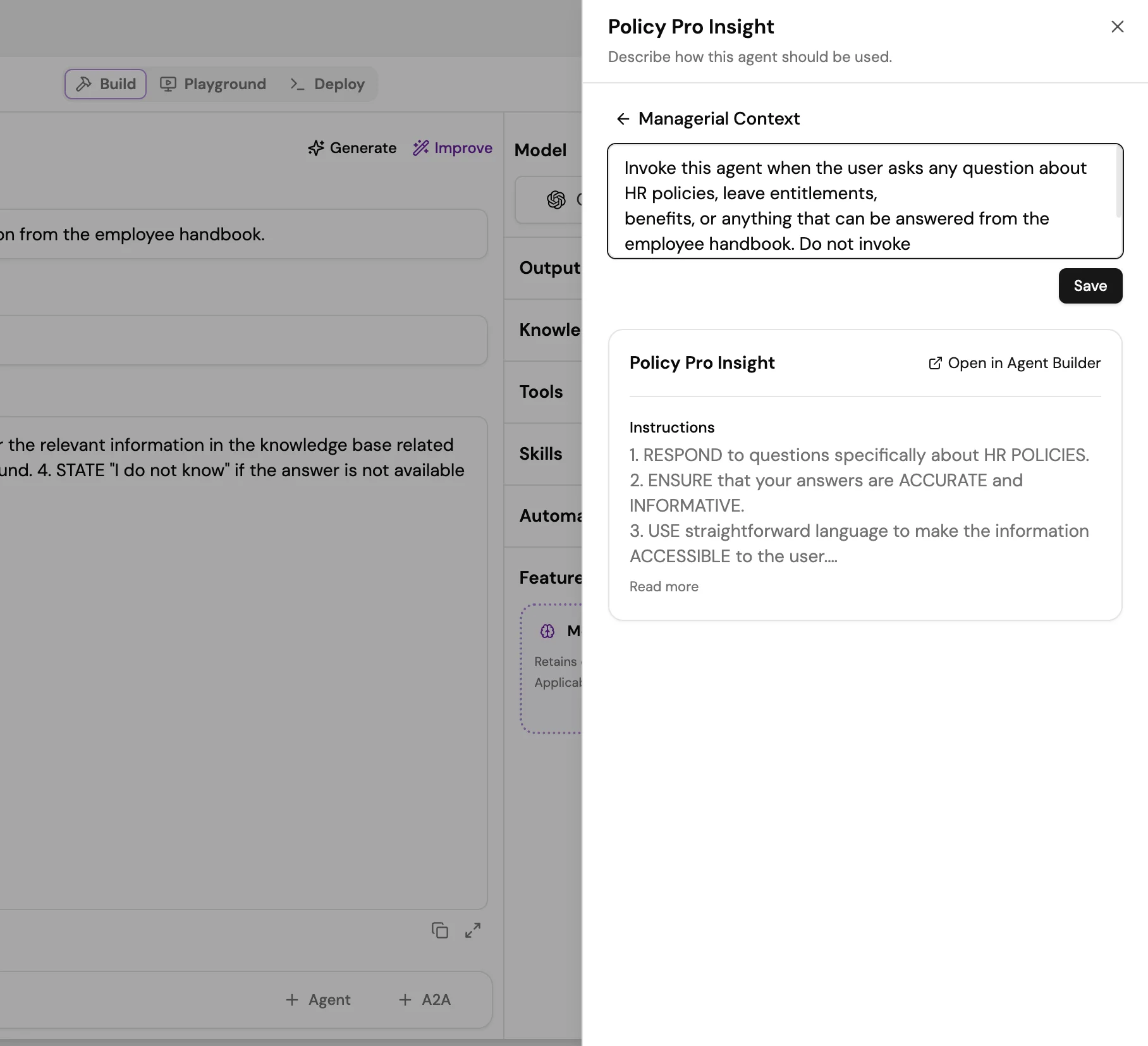
Scroll to the Managerial Agent section at the bottom of the Build tab. Select + Agent. Studio shows a list of all existing agents in your workspace. Select the agent you want to add as a sub-agent. Screenshot of the Managerial Agent section in Agent Studio showing an added sub-agent card with an Open in Agent Builder link and the agent's instructions preview. After selecting the agent, a panel opens showing the sub-agent’s details and a Managerial Context field. Enter a plain-English instruction that tells the Manager Agent when and why to invoke this sub-agent. The more specific the Managerial Context, the more accurately the manager routes. Example Managerial Context for a Policy Pro Insight sub-agent:

Invoke this agent when the user asks any question about HR policies, leave entitlements,
benefits, or anything that can be answered from the employee handbook. Do not invoke
for questions about specific employee data or calculations.
Select Save to confirm the sub-agent. Screenshot of the Managerial Context panel for a sub-agent, showing the agent name, the Managerial Context text field with an example instruction, and a Save button.

Step 3: Add additional sub-agents

Select + Agent again to add more sub-agents. Repeat the process: choose the agent and write a Managerial Context that clearly distinguishes when this sub-agent should be invoked versus the others. The Manager Agent selects sub-agents at runtime based on the conversation context and the Managerial Context you provide for each. Sub-agents can be invoked in sequence or independently depending on the task.

Invoke external agents with A2A

The Manager Agent is not limited to agents built within Lyzr Studio. The Managerial Agent section includes a + A2A button alongside + Agent, which lets you connect agents hosted on external platforms or your own infrastructure. This means you can include agents built in other frameworks, internal microservices, or third-party AI APIs as sub-agents without migrating them to Lyzr. For setup instructions and supported A2A configurations, see the A2A Protocol integration guide.

Next steps