

When to use SuperFlow
A single Lyzr agent handles tasks that fit one model with a set of tools. SuperFlow is the right choice when:- The workflow involves multiple steps that are not all LLM calls, for example: fetch from an API, run an agent, branch on the result, call another agent.
- The flow requires branching or looping based on data (if/else, case switching, iterate over a list).
- A human needs to approve something mid-flow before the workflow continues.
- You want to schedule the workflow to run on a cron (every Monday morning, every 5 minutes, and similar schedules).
- You are composing several agents together, such as a researcher feeding a writer feeding an editor.
Mental model
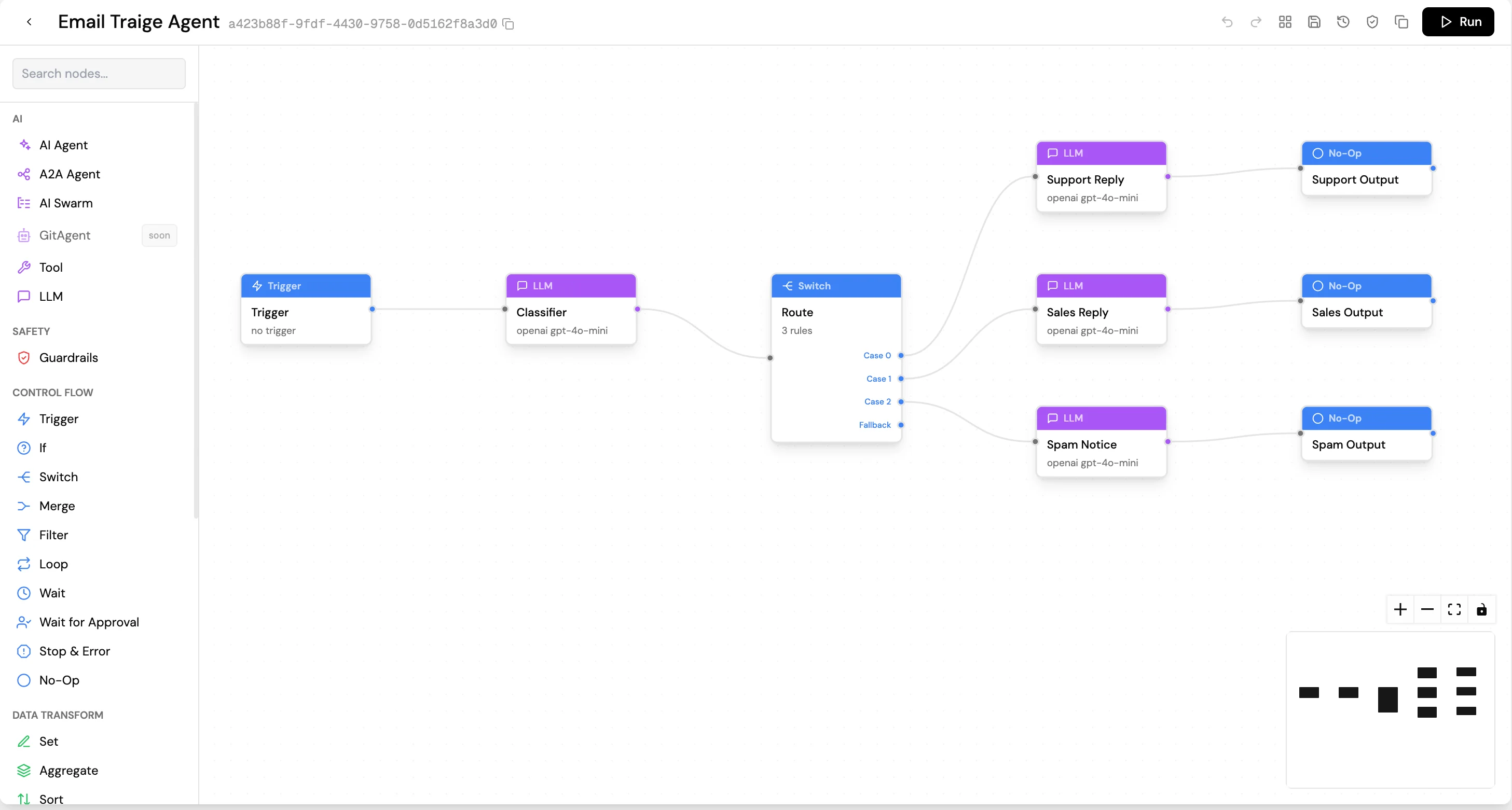
A SuperFlow is a graph of nodes connected by edges:- Every node has inputs and outputs, and data flows along the edges as JSON.
- Each node receives the output of the nodes upstream of it, does its job, and emits its own output downstream.
- A SuperFlow always starts with one Trigger node, which defines what input the workflow accepts.
- Downstream nodes can reference any upstream node’s output using expressions like
{{ $('Trigger').json.email }}.
Built for production workloads
Durable execution. Every meaningful step (LLM call, tool call, HTTP request, code execution, loop iteration) is journaled to durable storage before completion. A service restart in the middle of a 50-step workflow resumes from the exact point of failure, not from the beginning. Exactly-once side effects. A step that has already run successfully will never run again. No double charges, no duplicate emails, no re-fired API calls on retry. Once the journal records a step as completed, the engine treats it as final.- Durable execution. Every meaningful step (LLM call, tool call, HTTP request, code execution, loop iteration) is journaled to durable storage before completion. A service restart in the middle of a 50-step workflow resumes from the exact point of failure, not from the beginning.
- Exactly-once side effects. A step that has already run successfully will never run again. No double charges, no duplicate emails, no re-fired API calls on retry. Once the journal says “this step completed,” the engine treats that as final.
- Pauses are free. A SuperFlow waiting on a human approval, a schedule, or a delay consumes essentially no resources. Runs can wait hours, days, or weeks and resume exactly where they paused.
- Crash-safe schedules. Cron triggers use durable timers, not in-memory schedulers. A schedule won’t “miss a tick” because the runtime was down.
- Per-node retries with exponential backoff. Configure every node that talks to an external system to retry on transient failures. Retries are themselves durable: the retry count survives restarts.
- Error edges for graceful failure. When retries are exhausted, opt into an error output that routes failures to a recovery path (a fallback API, a Wait for Approval for human escalation, or a notification) instead of failing the whole run. Strictly opt-in per node.
- Live and historical observability. Watch a run in real time on the canvas; replay every past run with full per-node outputs preserved. OpenTelemetry traces are emitted end-to-end.
Triggers
Every SuperFlow starts with a Trigger node. Four modes are available:
Webhook example:
Expressions
Downstream nodes reference upstream outputs using expressions. All expressions use the{{ }} syntax:
Full JavaScript is valid inside
{{ }}, including ternary operators, array methods, and string operations. Use the field reference picker (plug icon) to build expressions without typing paths manually.
Node types
Nodes are organized in a palette by category:AI
Control Flow
Safety
I/O and Compute
Data Transform
Human-in-the-Loop
Document
Utility
Running and monitoring
During execution, the canvas shows real-time node status:- Amber pulse: currently executing
- Green check: completed successfully
- Red cross: errored
- Blue pause: awaiting human approval
- Pause: cooperative pause at node boundaries
- Resume: continues from the stopping point
- Terminate: cancels the run permanently