

Enabling memory on an agent
Memory is enabled per agent from the Features section in the Agent Builder, not from a global setting.- Open the agent in the Agent Builder.
- Scroll to the Features section at the bottom of the Build tab.
- Select the Memory card. It has a dashed border when enabled.
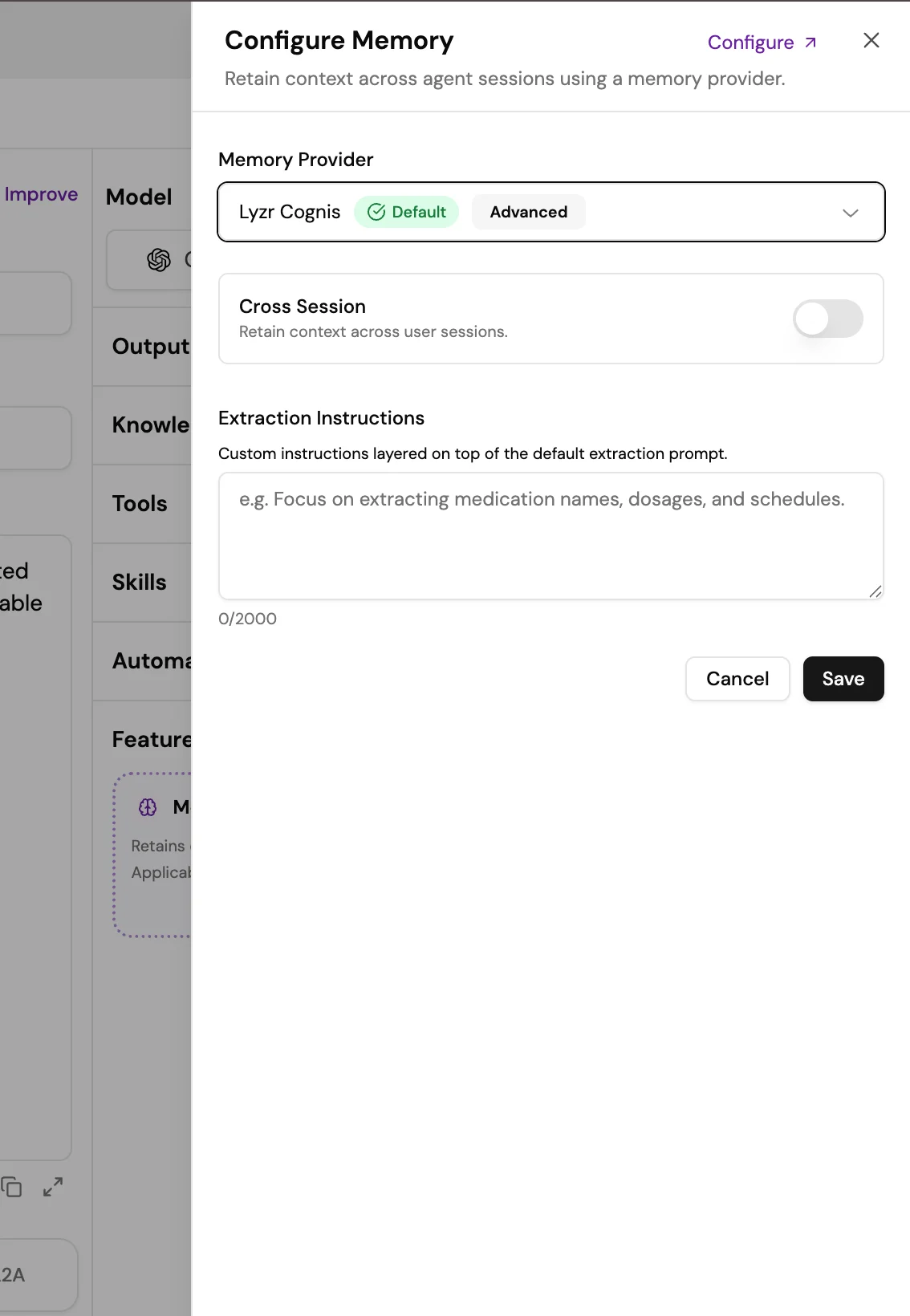
- Select the settings icon on the Memory card to open the Configure Memory panel.
- Choose a provider: Lyzr Cognis, Lyzr Memory, Amazon Bedrock AgentCore Memory, or another supported provider.
- If using Amazon Bedrock, enter your AWS credentials and resource details.
- Optionally add Extraction Instructions (see below).
- Select Update to save.
Extraction instructions
Extraction instructions tell the memory system what to pay attention to and store from each conversation. Without instructions, Cognis extracts memories automatically based on what it determines is significant. With instructions, you can tune what gets remembered for your specific use case. Examples:- “Remember the user’s name, role, and preferred communication style.”
- “Store any product names, pricing, or deal stages the user mentions.”
- “Track action items and decisions the user commits to.”
Memory providers
Lyzr Cognis (default)
Lyzr Cognis is the default memory provider for all agents in Lyzr Studio. It is designed for production workloads where cross-session context and temporal accuracy matter. Key capabilities:- Cross-session persistence: Cognis remembers users across separate sessions. If a user returns days or weeks later, the agent retains knowledge of previous interactions, preferences, and outcomes.
- Temporal awareness: Cognis understands the timing and sequence of interactions, so references like “last week” resolve correctly relative to the conversation history.
- Matryoshka embeddings: An embedding technique that optimizes both search accuracy and storage efficiency across retrieval tasks.
Lyzr Memory
Standard built-in memory for simpler single-session use cases. Lower overhead than Cognis, suitable for agents that do not need long-term user context.Amazon Bedrock AgentCore Memory
For organizations that require data sovereignty, this option stores all memory data within your own AWS account. Requires valid AWS credentials (access key and secret key), an existing Bedrock AgentCore Memory resource, and IAM permissions for that resource.Additional providers
Lyzr Studio supports further memory providers beyond the three above. Most require their own credentials, which you enter in the Configure Memory panel after you select the provider.Memory vs. Knowledge Base
How memory works at runtime
- The user sends a message. The agent looks up relevant memories by session ID or user ID.
- Relevant memories are injected into the agent’s context window alongside the current conversation and any Knowledge Base results.
- The agent generates a response.
- Cognis automatically stores and updates memories from the new interaction. Older memories are summarized; the most relevant are surfaced first.