

How A2A relates to MCP
A2A and Model Context Protocol (MCP) serve different layers of an agentic system:
They are complementary. An agent can use MCP to call its tools and A2A to coordinate with peer agents.
What A2A enables in Lyzr
- Call a LangChain or CrewAI agent as a sub-agent inside a Lyzr Manager Agent
- Call a Lyzr agent from an external A2A client or orchestration layer
- Build multi-framework pipelines where each agent is built and maintained independently
How A2A works
- The Lyzr Manager Agent sends a task request to an external agent via its A2A server URL.
- The external agent processes the input using its own tools and logic.
- The external agent returns a structured response.
- Lyzr uses the response directly or passes it to the next step in the orchestration.
Connecting an A2A agent in Studio
In a Manager Agent’s Build tab:- Scroll to the Managerial Agent section.
- Select + A2A (next to + Agent).
- Enter the A2A server URL of the external agent.
- If the external agent requires authentication, choose an Authentication method and select or create a credential — see Authentication for A2A connections below.
- Write a Managerial Context that tells the manager when to invoke this external agent.
Import an A2A agent into the Registry
Alongside calling an external agent from a Manager Agent, you can import an A2A agent into the Agent Registry as a standalone agent. An imported agent behaves like any other agent in your workspace. To import an agent, open the Agent Registry, open the New menu in the top right, and select Import (A2A). Enter the A2A server URL of the external agent. If the agent is protected, choose an Authentication method and a credential (see Authentication for A2A connections) — otherwise leave it as No Auth. Lyzr reads the server and imports the agent into the Registry automatically, where it appears under the External tab.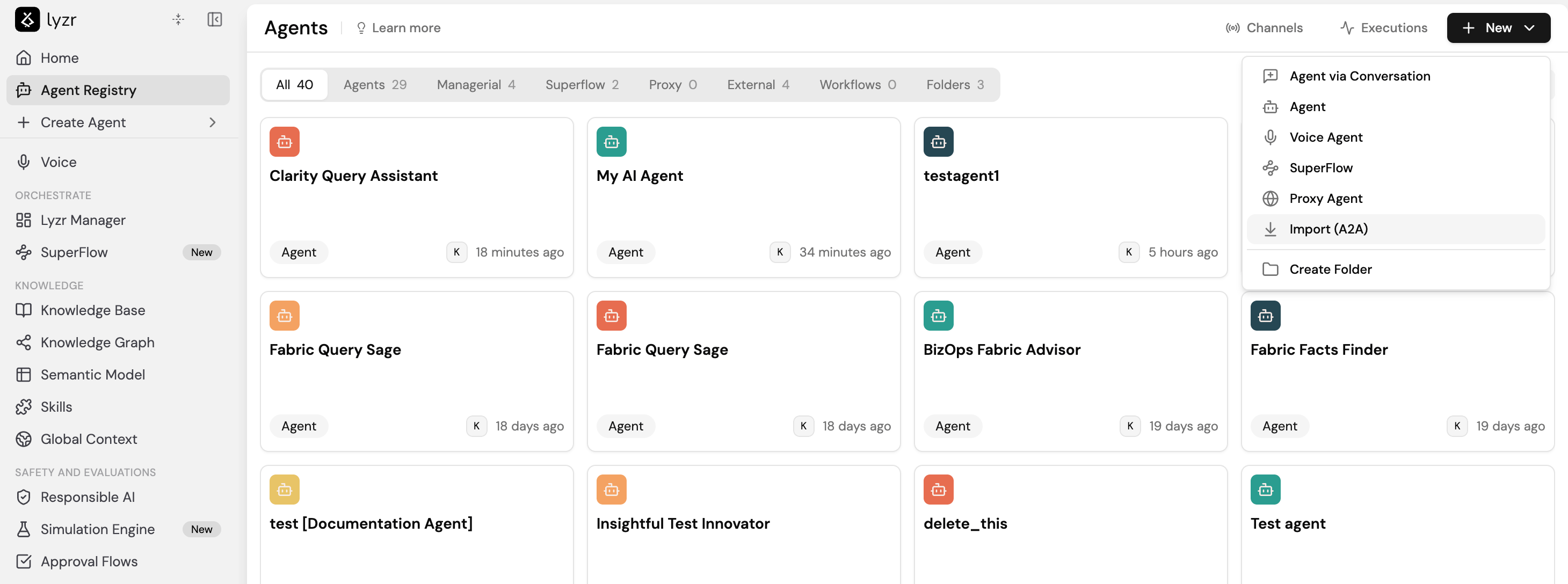
- The imported agent persists in the Registry until you delete it manually.
- Full trace visibility and monitoring are available for the imported agent.
- You can evaluate any two agents against each other, including an imported agent against a native one.
- The agent is available through its API endpoint and as an A2A server out of the box, with no extra setup.
Authentication for A2A connections
Both connection points above — + A2A in a Manager Agent and Import (A2A) in the Registry — show the same Authentication dropdown. Lyzr stores only anauth_type and a credential_id on the agent; the actual secret lives in a separate, reusable credential record and is fetched fresh (and, for OAuth-based types, exchanged for a bearer token) on every discovery-card fetch and every inference call.
Databricks Apps sit behind an OAuth-only front door. Personal access tokens and interactive user tokens are both rejected with
401 — Databricks OAuth using a service principal’s client-credentials is the only way to reach one non-interactively. See the walkthrough below if that’s what you’re connecting.Creating a credential
Credentials are created once and reused across any number of A2A connections that share the same backing identity (e.g. one Databricks service principal used by several imported agents in the same workspace):- In the Authentication dropdown, pick the method the target agent needs.
- In the Credential field below it, select Create new.
- Name the credential and fill in the fields for that method (see the table above).
- Save. The credential is now selectable on this connection and on any other A2A connection using the same Authentication method.
credential_id is what you pass as credential_id when creating the A2A agent through the API (see the next section).
provider_id values (databricks_a2a, azure_a2a, a2a_api_key) are platform-level definitions, not per-user config — a workspace admin creates each one once per Lyzr deployment. If POST /v3/providers/credentials for databricks_a2a returns a “provider not found”-style error, ask your platform admin to register the provider first.Connecting a Databricks-hosted A2A agent end-to-end
This section walks through the full path for an A2A agent served from a Databricks App — the case that needs the most setup, because the app’s front door only accepts Databricks OAuth tokens.1. Confirm the agent needs Databricks OAuth
If the agent’s discovery card URL (<base_url>/.well-known/agent-card.json) is on a Databricks Apps domain (*.databricksapps.com), it needs Databricks OAuth. A quick way to confirm: an unauthenticated request to that URL returns 401, and a Databricks personal access token (PAT) also returns 401 — only a Databricks OAuth bearer token is accepted.
2. Create a service principal
Databricks console — Settings → Identity and access → Service principals → Add service principal → name it (e.g.lyzr-a2a).
Databricks CLI — equivalent:
applicationId is the client ID you’ll use in Lyzr. Keep the numeric id field too — the next step needs it, but it is not the client ID.
3. Generate a client secret
Console — open the service principal → Secrets tab → Generate secret. Copy the secret value immediately; it is shown once. CLI:secret field is the client secret.
4. Grant the service principal access to the app
A valid OAuth token is not enough on its own — the service principal also needs permission on the specific Databricks App. Without this step you’ll still get401 even with a correct token.
Console — open the app in the Databricks workspace → Permissions → add the service principal with Can Use.
CLI:
5. Create the credential in Lyzr
Using the Studio picker (see Creating a credential above) or the API, with:6. Connect the agent in Studio
Use either entry point:- Manager Agent — Build tab → Managerial Agent → + A2A → enter the app’s A2A base URL (e.g.
https://<app>.aws.databricksapps.com/api) → Authentication: Databricks OAuth → select the credential from step 5. - Agent Registry — New → Import (A2A) → same base URL and Authentication choice.
200 with an agent_id means Lyzr fetched the discovery card successfully — the connection is live. Verify it end-to-end with a test message: