

managed_agents array that tells the manager which sub-agents it can invoke for the given task.
To find your agent’s API key and endpoint URL, open the agent in Lyzr Studio and click Agent API.
Request body
A basic request passes aquery field. When calling a Manager Agent, you also include the managed_agents array.
The managed_agents array
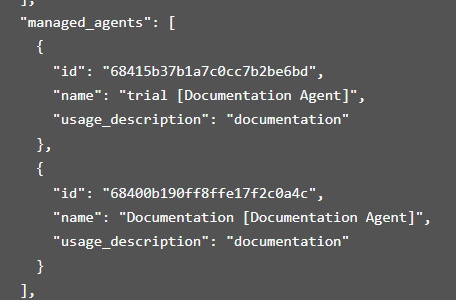
Themanaged_agents array tells the Manager Agent which sub-agents are available for the current request. Each item in the array identifies one sub-agent:
Fields
id (string, required)
The unique identifier for the sub-agent, generated by Lyzr Studio. The Manager Agent uses this ID to invoke the correct sub-agent at runtime. You can find it in Studio when viewing an agent’s configuration, or in API responses that list agents.
name (string, required)
A human-readable label for the sub-agent. This appears in logs and traces to identify which agent was invoked.
usage_description (string, required)
A short description of the sub-agent’s purpose. The Manager Agent reads this at runtime to decide which sub-agent to route a task to. A specific, unambiguous description improves routing accuracy.