

dev to main to prod) only after the required number of reviewers have approved the change. This ensures that production deployments go through the right review process and that your production environment stays separated from development.
Each environment has its own pipeline. An approval flow defines the stages in that pipeline and the gates between them.
Pipeline structure
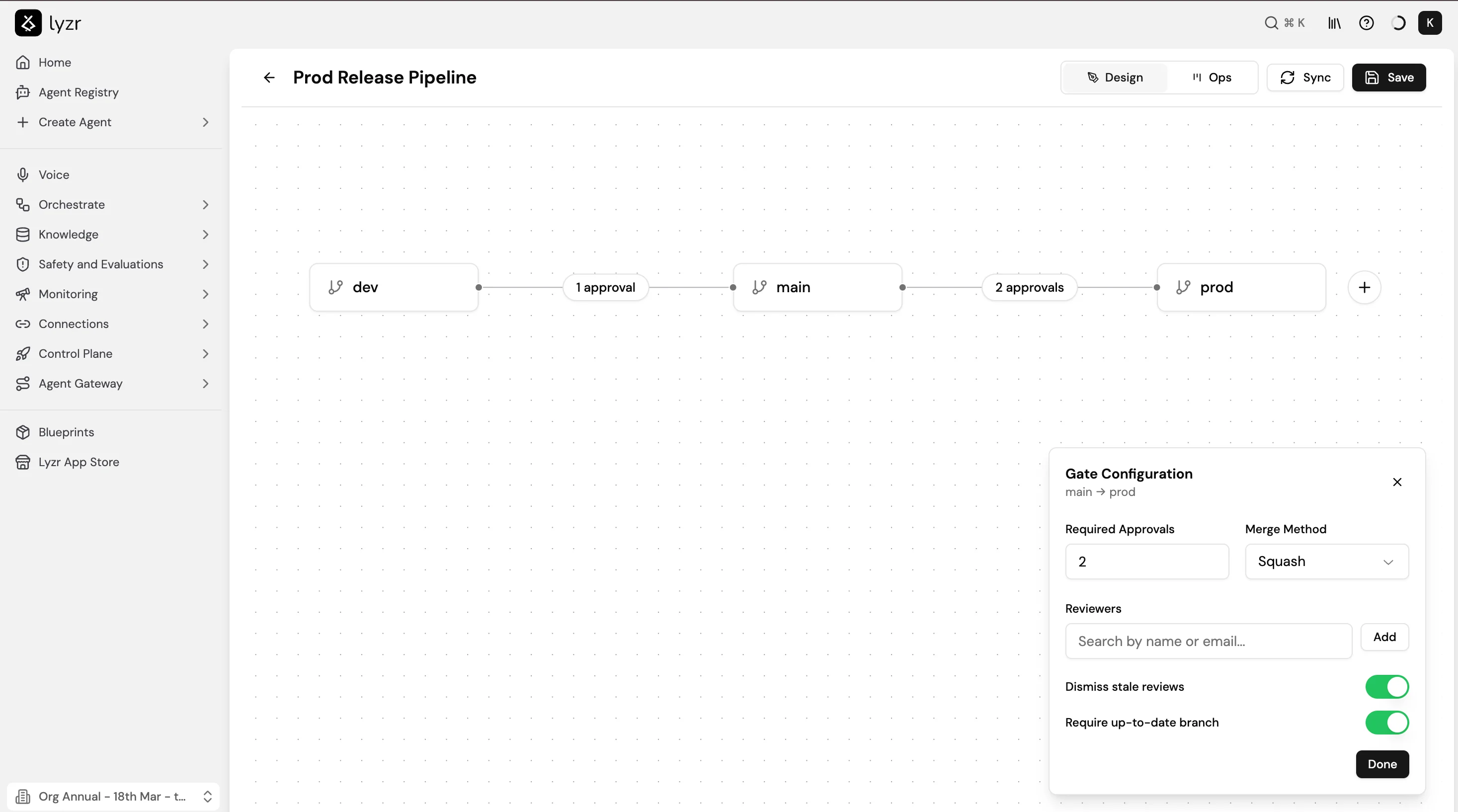
A pipeline is a sequence of branches connected by approval gates. Each gate between two branches specifies:- Required Approvals: the minimum number of reviewer approvals needed before the branch can be promoted.
- Merge Method: how the change is merged (Squash, Merge, or Rebase).
- Reviewers: specific team members or roles who must review the change.
- Dismiss stale reviews: whether approvals are automatically dismissed when new changes are pushed.
- Require up-to-date branch: whether the source branch must be in sync with the target before merging is allowed.
Creating an approval flow
- Go to Control Plane > Environments, open the environment you want to configure, and select Open pipeline.
- The pipeline opens in Design view. Add branches using the + button at the end of the pipeline.
- Select the gate between any two branches to open the Gate Configuration panel.
- Set the Required Approvals count, Merge Method, and Reviewers.
- Toggle Dismiss stale reviews and Require up-to-date branch as needed.
- Select Save.
Promoting an agent
When a developer wants to promote an agent to the next branch:- They push the agent version to the source branch via GitAgent.
- A promotion request is created and sent to the configured reviewers.
- Reviewers receive a notification and can approve or reject with an optional note.
- Once the required number of approvals is reached, the branch promotion proceeds automatically using the configured Merge Method.
- If a reviewer requests changes, the promotion is blocked until the change is addressed and re-approved.