> ## Documentation Index
> Fetch the complete documentation index at: https://docs.lyzr.ai/llms.txt
> Use this file to discover all available pages before exploring further.
# Quick Start
> Pre-built chat agent by Lyzr
## Getting Started with Lyzr Chat Agent SDK
Lyzr's Chat Agent is powered by a state-of-the-art chatbot architecture that super abstracts all the complexity of building an advanced LLM-powered chatbot. This enables developers to focus more on data quality, prompt quality, and the application use case instead of spending countless hours stitching together various building blocks and indexes to build the backend RAG pipeline.
**Lyzr's Chat Agent integrates all the building blocks of a chatbot**
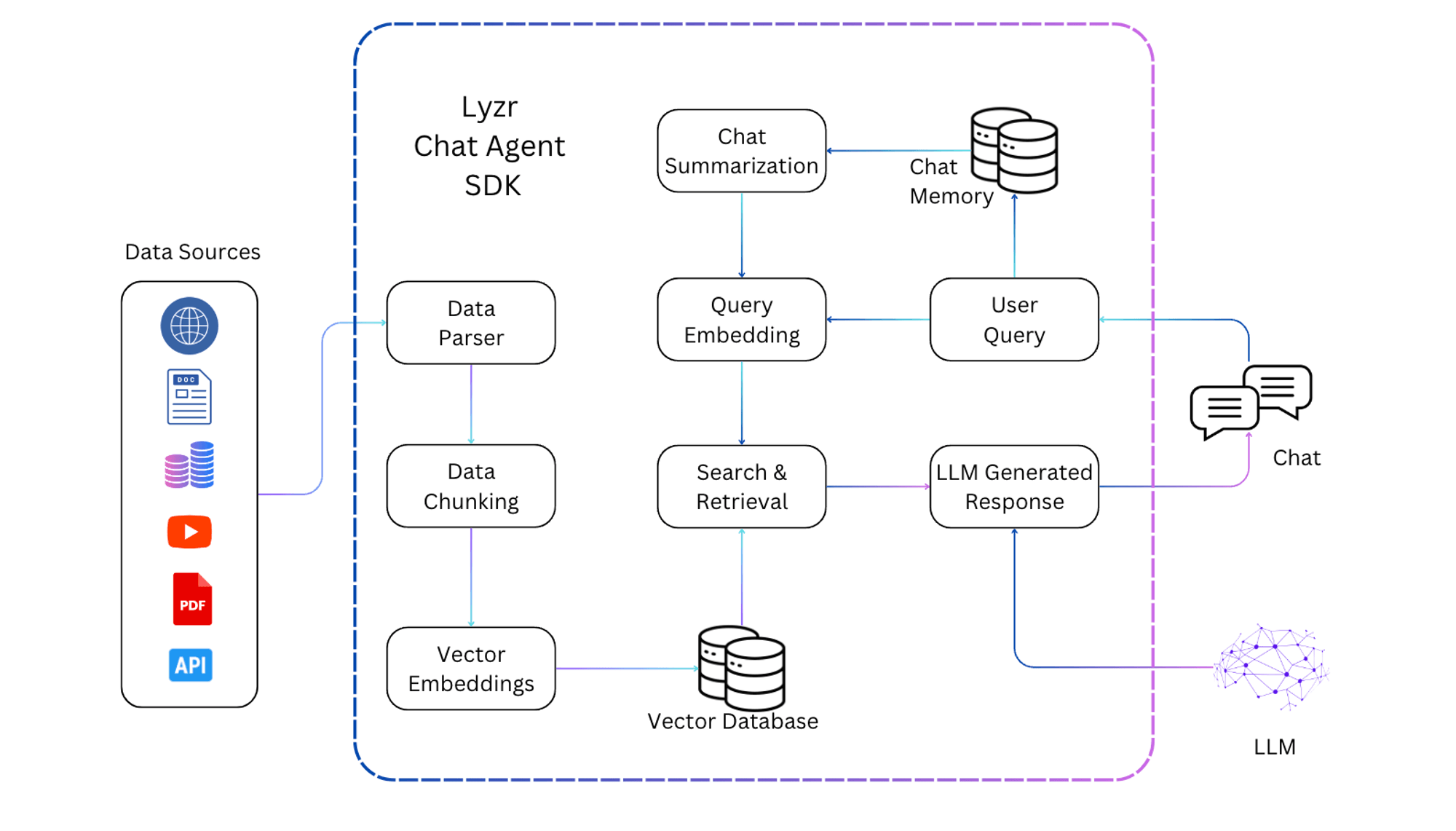 ## What are the various methods and arguments that you could pass to Lyzr's ChatBot class?
**Methods**
| Method | What it does? |
| ------------- | ------------------------------------------------------------------- |
| pdf\_chat | chat with PDF documents |
| website\_chat | automatically scrape the website content and chat with website data |
| docx\_chat | chat with Microsoft Word documents |
| txt\_chat | chat with flat files |
| youtube\_chat | chat with youtube content (must have transcriptions) |
| webpage\_chat | automatically scrape the webpage content and chat with webpage data |
## Chat with PDF
**Sample Code 👇**
```python theme={null}
import os
from lyzr import ChatBot
# Set your OpenAI API key
os.environ['OPENAI_API_KEY'] = 'sk-'
# Initialize the PDF Chatbot with the path to the PDF file
chatbot = ChatBot.pdf_chat(
input_files=["PATH/TO/YOUR/PDF/FILE"],
)
# Ask a question related to the PDF content
response = chatbot.chat("Your question here")
# Print the chatbot's response
print(response.response)
# Access source nodes for additional information
for n, source in enumerate(response.source_nodes):
print(f"Source {n+1}")
print(source.text)
```
**Types of Arguments**
```python theme={null}
pdf_chat(
input_dir: Optional[str] = None,
input_files: Optional[List] = None,
exclude_hidden: bool = True,
filename_as_id: bool = True,
recursive: bool = True,
required_exts: Optional[List[str]] = None,
system_prompt: str = None,
query_wrapper_prompt: str = None,
embed_model: Union[str, EmbedType] = "default",
llm_params: dict = None,
vector_store_params: dict = None,
service_context_params: dict = None,
chat_engine_params: dict = None,
retriever_params: dict = None,
):
```
Use `input_dir` to parse all the .pdf files from a directory.
Pass a list of .pdf file paths.
Set to `true` to ignore hidden files when using `input_dir`.
Set to `true` to consider the filename as the id for indexing the parsed data.
Set to `true` to parse files from all subdirectories.
System-wide prompt to be prepended to all input prompts, used to guide system "decision making".
A specific wrapper instruction for passed-in input queries.
The default embed model is OpenAI `text-embedding-ada-002`. Default fallback model is `bge` from Hugging Face.
Default language model is OpenAI `gpt-4-0125-preview`. Default temperature is 0.
The default vector store is Embedded Weaviate DB.
Default chunk\_size is 1024 tokens. Default overlap is 20 tokens.
Default is none.
Default is none.
## Integrations
### Vector Store Integrations
#### Lyzr + Weaviate
```python theme={null}
vector_store_params = {
"vector_store_type": "WeaviateVectorStore",
"index_name": "IndexName" # first letter should be capital
}
```
```python theme={null}
vector_store_params = {
"vector_store_type": "WeaviateVectorStore",
"url": "https://sample..weaviate.network",
"api_key": "DB_API_KEY",
"index_name": "IndexName" # first letter should be capital
}
```
#### Lyzr + Supabase Pgvector
Install vecs and supabase
```bash theme={null}
pip install vecs supabase
```
```python theme={null}
vector_store_params = {
"vector_store_type": "SupabaseVectorStore",
"postgres_connection_string": "postgresql://:@:/",
"collection_name":"base_demo",
}
```
#### Lyzr + Qdrant Vector Store
```bash theme={null}
!pip install -U qdrant_client
```
```python theme={null}
client = qdrant_client.QdrantClient(
location=":memory:"
)
vector_store_params = {
"vector_store_type": "QdrantVectorStore",
"client": client,
"collection_name":"base_demo",
}
```
```python theme={null}
client = qdrant_client.QdrantClient(
uri="http://:"
api_key="",
)
vector_store_params = {
"vector_store_type": "QdrantVectorStore",
"client": client,
"collection_name":"base_demo",
}
```
#### Lyzr + LanceDB Vector Store
```bash theme={null}
!pip install -U lancedb
```
```python theme={null}
vector_store_params = {
"vector_store_type": "LanceDBVectorStore",
"uri": "/tmp/lancedb"),
"table_name":"base_demo",
}
```
#### Lyzr + Azure Cognitive Search
```bash theme={null}
pip install azure-search-documents==11.4.0 azure-identity
```
```python theme={null}
from azure.search.documents.indexes import SearchIndexClient
from azure.search.documents import SearchClient
from azure.core.credentials import AzureKeyCredential
search_service_name = getpass.getpass("Azure Cognitive Search Service Name")
key = getpass.getpass("Azure Cognitive Search Key")
cognitive_search_credential = AzureKeyCredential(key)
service_endpoint = f"https://{search_service_name}.search.windows.net"
index_name = "quickstart"
index_client = SearchIndexClient(
endpoint=service_endpoint,
credential=cognitive_search_credential,
)
vector_store_params = {
"vector_store_type": "CognitiveSearchVectorStore",
"search_or_index_client": index_client),
"index_name":index_name,
}
```
### LLM Integration
```python theme={null}
llm_params = {
"model":"gpt-4-0125-preview",
"api_key":"sk-"
"temperature":0,
"top_p":0,
}
```
```python theme={null}
llm_params = {
"model": "azure/gpt-35-turbo-16k",
"api_base": "https://.azure.com/",
"api_version": "2024-02-15-preview",
"api_key": "",
"max_retries": 1
}
```
## What are the various methods and arguments that you could pass to Lyzr's ChatBot class?
**Methods**
| Method | What it does? |
| ------------- | ------------------------------------------------------------------- |
| pdf\_chat | chat with PDF documents |
| website\_chat | automatically scrape the website content and chat with website data |
| docx\_chat | chat with Microsoft Word documents |
| txt\_chat | chat with flat files |
| youtube\_chat | chat with youtube content (must have transcriptions) |
| webpage\_chat | automatically scrape the webpage content and chat with webpage data |
## Chat with PDF
**Sample Code 👇**
```python theme={null}
import os
from lyzr import ChatBot
# Set your OpenAI API key
os.environ['OPENAI_API_KEY'] = 'sk-'
# Initialize the PDF Chatbot with the path to the PDF file
chatbot = ChatBot.pdf_chat(
input_files=["PATH/TO/YOUR/PDF/FILE"],
)
# Ask a question related to the PDF content
response = chatbot.chat("Your question here")
# Print the chatbot's response
print(response.response)
# Access source nodes for additional information
for n, source in enumerate(response.source_nodes):
print(f"Source {n+1}")
print(source.text)
```
**Types of Arguments**
```python theme={null}
pdf_chat(
input_dir: Optional[str] = None,
input_files: Optional[List] = None,
exclude_hidden: bool = True,
filename_as_id: bool = True,
recursive: bool = True,
required_exts: Optional[List[str]] = None,
system_prompt: str = None,
query_wrapper_prompt: str = None,
embed_model: Union[str, EmbedType] = "default",
llm_params: dict = None,
vector_store_params: dict = None,
service_context_params: dict = None,
chat_engine_params: dict = None,
retriever_params: dict = None,
):
```
Use `input_dir` to parse all the .pdf files from a directory.
Pass a list of .pdf file paths.
Set to `true` to ignore hidden files when using `input_dir`.
Set to `true` to consider the filename as the id for indexing the parsed data.
Set to `true` to parse files from all subdirectories.
System-wide prompt to be prepended to all input prompts, used to guide system "decision making".
A specific wrapper instruction for passed-in input queries.
The default embed model is OpenAI `text-embedding-ada-002`. Default fallback model is `bge` from Hugging Face.
Default language model is OpenAI `gpt-4-0125-preview`. Default temperature is 0.
The default vector store is Embedded Weaviate DB.
Default chunk\_size is 1024 tokens. Default overlap is 20 tokens.
Default is none.
Default is none.
## Integrations
### Vector Store Integrations
#### Lyzr + Weaviate
```python theme={null}
vector_store_params = {
"vector_store_type": "WeaviateVectorStore",
"index_name": "IndexName" # first letter should be capital
}
```
```python theme={null}
vector_store_params = {
"vector_store_type": "WeaviateVectorStore",
"url": "https://sample..weaviate.network",
"api_key": "DB_API_KEY",
"index_name": "IndexName" # first letter should be capital
}
```
#### Lyzr + Supabase Pgvector
Install vecs and supabase
```bash theme={null}
pip install vecs supabase
```
```python theme={null}
vector_store_params = {
"vector_store_type": "SupabaseVectorStore",
"postgres_connection_string": "postgresql://:@:/",
"collection_name":"base_demo",
}
```
#### Lyzr + Qdrant Vector Store
```bash theme={null}
!pip install -U qdrant_client
```
```python theme={null}
client = qdrant_client.QdrantClient(
location=":memory:"
)
vector_store_params = {
"vector_store_type": "QdrantVectorStore",
"client": client,
"collection_name":"base_demo",
}
```
```python theme={null}
client = qdrant_client.QdrantClient(
uri="http://:"
api_key="",
)
vector_store_params = {
"vector_store_type": "QdrantVectorStore",
"client": client,
"collection_name":"base_demo",
}
```
#### Lyzr + LanceDB Vector Store
```bash theme={null}
!pip install -U lancedb
```
```python theme={null}
vector_store_params = {
"vector_store_type": "LanceDBVectorStore",
"uri": "/tmp/lancedb"),
"table_name":"base_demo",
}
```
#### Lyzr + Azure Cognitive Search
```bash theme={null}
pip install azure-search-documents==11.4.0 azure-identity
```
```python theme={null}
from azure.search.documents.indexes import SearchIndexClient
from azure.search.documents import SearchClient
from azure.core.credentials import AzureKeyCredential
search_service_name = getpass.getpass("Azure Cognitive Search Service Name")
key = getpass.getpass("Azure Cognitive Search Key")
cognitive_search_credential = AzureKeyCredential(key)
service_endpoint = f"https://{search_service_name}.search.windows.net"
index_name = "quickstart"
index_client = SearchIndexClient(
endpoint=service_endpoint,
credential=cognitive_search_credential,
)
vector_store_params = {
"vector_store_type": "CognitiveSearchVectorStore",
"search_or_index_client": index_client),
"index_name":index_name,
}
```
### LLM Integration
```python theme={null}
llm_params = {
"model":"gpt-4-0125-preview",
"api_key":"sk-"
"temperature":0,
"top_p":0,
}
```
```python theme={null}
llm_params = {
"model": "azure/gpt-35-turbo-16k",
"api_base": "https://.azure.com/",
"api_version": "2024-02-15-preview",
"api_key": "",
"max_retries": 1
}
```