> ## Documentation Index
> Fetch the complete documentation index at: https://docs.lyzr.ai/llms.txt
> Use this file to discover all available pages before exploring further.
# Template Apps
> Skip the blank canvas. Launch pre-configured, industry-standard agentic workflows in just one click.
## The Fastest Way to Build
While Architect's AI Consultant and prompt bar allow you to build anything from scratch, sometimes you just need a standard solution right now. Architect provides a library of **Template Apps**—expertly engineered blueprints for common business use cases.
 ## Available Templates
Architect provides a growing library of templates designed for immediate enterprise value. Some popular examples include:
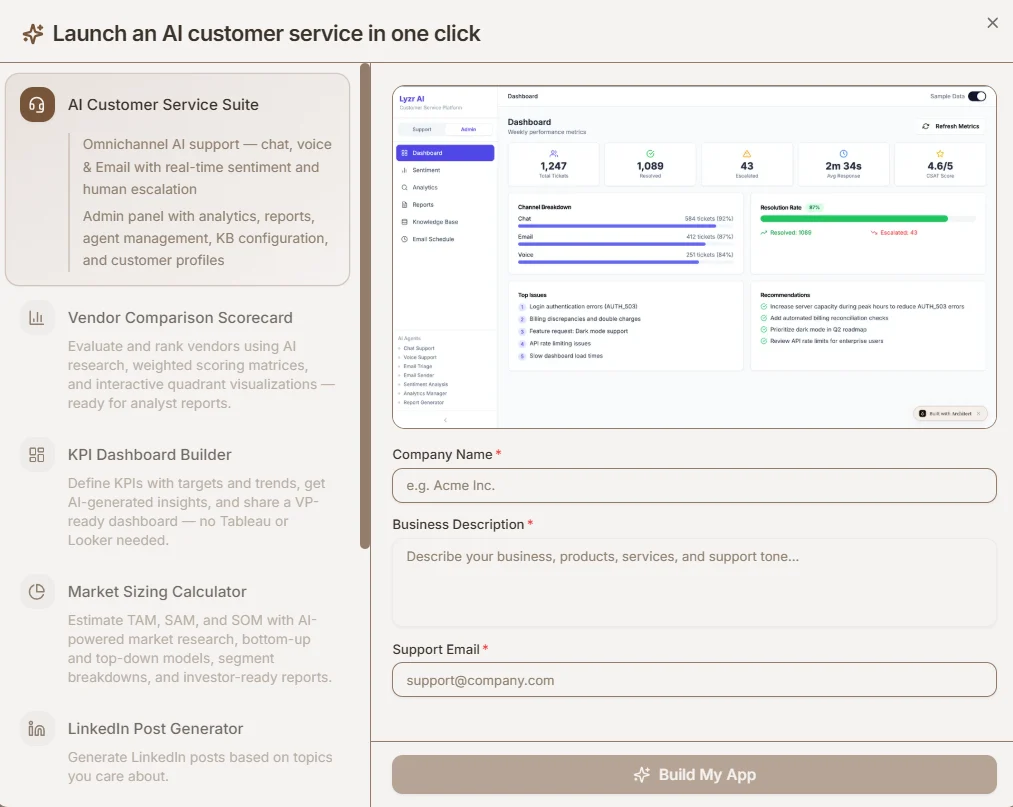
* **AI Customer Service Suite:** An omnichannel support platform (chat, voice, email) with real-time sentiment analysis and human escalation protocols.
* **Vendor Comparison Scorecard:** Evaluates and ranks vendors using AI research, generating interactive quadrant visualizations.
* **KPI Dashboard Builder:** Defines KPIs with targets and trends, generating VP-ready analytical reports.
* **Market Sizing Calculator:** Estimates TAM, SAM, and SOM using AI-powered market research and top-down models.
* **LinkedIn Post Generator:** Autonomously generates professional social media content based on your specific industry topics.
## How to Deploy a Template
Deploying a template is incredibly straightforward. You do not need to write a complex prompt or map out the agent architecture.
1. **Select a Template:** Choose the blueprint that fits your needs from the library.
2. **Provide Context:** Fill in a few basic fields to customize the app for your organization. For example, if deploying the Customer Service Suite, you simply provide:
* Your Company Name
* A Business Description (products, tone of voice)
* Your Support Email
3. **Build:** Click **Build My App**. Architect will automatically provision the database, construct the agents, and generate the UI tailored to the information you provided.
## Available Templates
Architect provides a growing library of templates designed for immediate enterprise value. Some popular examples include:
* **AI Customer Service Suite:** An omnichannel support platform (chat, voice, email) with real-time sentiment analysis and human escalation protocols.
* **Vendor Comparison Scorecard:** Evaluates and ranks vendors using AI research, generating interactive quadrant visualizations.
* **KPI Dashboard Builder:** Defines KPIs with targets and trends, generating VP-ready analytical reports.
* **Market Sizing Calculator:** Estimates TAM, SAM, and SOM using AI-powered market research and top-down models.
* **LinkedIn Post Generator:** Autonomously generates professional social media content based on your specific industry topics.
## How to Deploy a Template
Deploying a template is incredibly straightforward. You do not need to write a complex prompt or map out the agent architecture.
1. **Select a Template:** Choose the blueprint that fits your needs from the library.
2. **Provide Context:** Fill in a few basic fields to customize the app for your organization. For example, if deploying the Customer Service Suite, you simply provide:
* Your Company Name
* A Business Description (products, tone of voice)
* Your Support Email
3. **Build:** Click **Build My App**. Architect will automatically provision the database, construct the agents, and generate the UI tailored to the information you provided.