> ## Documentation Index
> Fetch the complete documentation index at: https://docs.lyzr.ai/llms.txt
> Use this file to discover all available pages before exploring further.
# What is SuperFlow
> Lyzr's visual DAG-based workflow builder for chaining agents, LLM calls, tools, and control flow into durable automations.
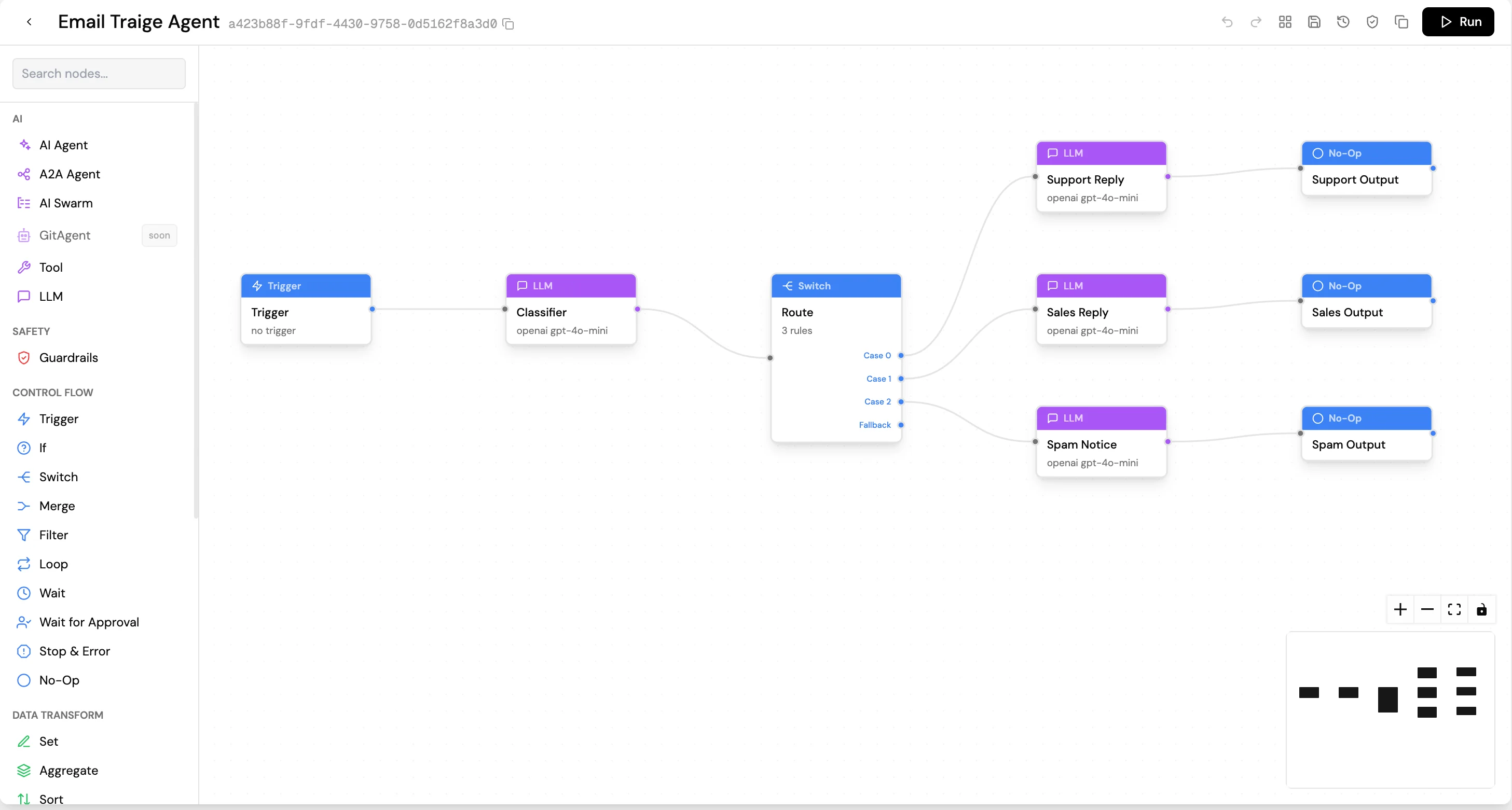
SuperFlow is Lyzr's visual workflow builder. It lets you chain AI agents, LLM calls, tools, HTTP requests, code, conditionals, loops, and human approvals into a single automation on a drag-and-drop canvas, with no glue code to maintain.
SuperFlow is built for production workloads. Every step is durably journaled, every successful step runs exactly once, and every in-flight run survives crashes, restarts, and deployments without losing work. Long-running approvals can pause for days or weeks at zero cost. Failed steps retry automatically. Past runs are replayable end-to-end.
You can find SuperFlow in [Agent Studio](https://studio.lyzr.ai/superflow).
## When to use SuperFlow
A single Lyzr agent handles tasks that fit one model with a set of tools. SuperFlow is the right choice when:
* The workflow involves multiple steps that are not all LLM calls, for example: fetch from an API, run an agent, branch on the result, call another agent.
* The flow requires branching or looping based on data (if/else, case switching, iterate over a list).
* A human needs to approve something mid-flow before the workflow continues.
* You want to schedule the workflow to run on a cron (every Monday morning, every 5 minutes, and similar schedules).
* You are composing several agents together, such as a researcher feeding a writer feeding an editor.
## Mental model
A SuperFlow is a graph of **nodes** connected by **edges**:
* Every node has inputs and outputs, and data flows along the edges as JSON.
* Each node receives the output of the nodes upstream of it, does its job, and emits its own output downstream.
* A SuperFlow always starts with one **Trigger** node, which defines what input the workflow accepts.
* Downstream nodes can reference any upstream node's output using expressions like `{{ $('Trigger').json.email }}`.
This is the same idea as a flowchart, except every box is an executable step and the lines between them carry real data.
 ## Built for production workloads
**Durable execution.** Every meaningful step (LLM call, tool call, HTTP request, code execution, loop iteration) is journaled to durable storage before completion. A service restart in the middle of a 50-step workflow resumes from the exact point of failure, not from the beginning.
**Exactly-once side effects.** A step that has already run successfully will never run again. No double charges, no duplicate emails, no re-fired API calls on retry. Once the journal records a step as completed, the engine treats it as final.
* **Durable execution.** Every meaningful step — LLM call, tool call, HTTP request, code execution, loop iteration — is journaled to durable storage before completion. A service restart in the middle of a 50-step workflow resumes from the exact point of failure, not from the beginning.
* **Exactly-once side effects.** A step that has already run successfully will never run again. No double charges, no duplicate emails, no re-fired API calls on retry. Once the journal says "this step completed," the engine treats that as final.
* **Pauses are free.** A SuperFlow waiting on a human approval, a schedule, or a delay consumes essentially no resources. Runs can wait hours, days, or weeks and resume exactly where they paused.
* **Crash-safe schedules.** Cron triggers use durable timers, not in-memory schedulers. A schedule won't "miss a tick" because the runtime was down.
* **Per-node retries with exponential backoff.** Configure every node that talks to an external system to retry on transient failures. Retries are themselves durable — the retry count survives restarts.
* **Error edges for graceful failure.** When retries are exhausted, opt into an error output that routes failures to a recovery path — a fallback API, a Wait for Approval for human escalation, or a notification — instead of failing the whole run. Strictly opt-in per node.
* **Live and historical observability.** Watch a run in real time on the canvas; replay every past run with full per-node outputs preserved. OpenTelemetry traces are emitted end-to-end.
## Triggers
Every SuperFlow starts with a **Trigger** node. Three modes are available:
| Mode | Use |
| -------- | ---------------------------------------------------------------------------- |
| Manual | Click Run in the editor. Best for testing. |
| Webhook | An external system posts to a URL and the payload becomes the Trigger input. |
| Schedule | Runs automatically on a cron expression using crash-safe durable timers. |
Webhook example:
```bash theme={null}
curl -X POST "https://" \
-H "X-Webhook-Secret: " \
-d '{"customer_id": "cus_123", "event": "trial_expiring"}'
```
## Expressions
Downstream nodes reference upstream outputs using expressions. All expressions use the `{{ }}` syntax:
| Expression | What it returns |
| --------------------------------- | ---------------------------------- |
| `{{ $json }}` | The entire input item |
| `{{ $json.field }}` | A single field from the input |
| `{{ $('Trigger').json.email }}` | A specific field from a named node |
| `{{ $('AI Agent').json.output }}` | The output from an AI Agent node |
Full JavaScript is valid inside `{{ }}`, including ternary operators, array methods, and string operations. Use the **field reference picker** (plug icon) to build expressions without typing paths manually.
## Node types
Nodes are organized in a palette by category:
### AI
| Node | What it does |
| ------------- | ----------------------------------------------------------------------------------------- |
| **AI Agent** | Runs a Lyzr agent with all its tools, KB, and memory. The full agent config carries over. |
| **A2A Agent** | Invokes an external agent via the Agent-to-Agent protocol. |
| **LLM** | Calls a model inline with a custom system prompt. Can orchestrate sub-agents via ReAct. |
| **AI Swarm** | Runs multiple agents in parallel and merges results. |
| **Tool** | Calls a configured tool directly without going through an agent. |
### Control Flow
| Node | What it does |
| ------------------ | --------------------------------------------------------------------------- |
| **If** | Binary branch. Rule mode (visual conditions) or AI mode (natural language). |
| **Switch** | Multi-way branch on a field value. |
| **Loop** | Iterates over a list, once per item or in batches. |
| **Filter** | Removes items that do not match a condition. |
| **Merge** | Combines outputs from parallel branches. |
| **Stop and Error** | Terminates the run with an error. |
| **Wait** | Pauses for a fixed duration. |
| **NoOp** | Passthrough node, useful for labeling branch points. |
### Safety
| Node | What it does |
| -------------- | ---------------------------------------------------------------------- |
| **Guardrails** | Applies a Responsible AI policy to the data flowing through this step. |
### I/O and Compute
| Node | What it does |
| -------------------- | ----------------------------------------------------------------------------------------------------------------------------------------------------------------------------------------------------------- |
| **HTTP Request** | Call any URL (GET, POST, PUT, PATCH, DELETE). Built-in authentication (Bearer, Basic, API Key, OAuth2 client credentials, AWS SigV4, JWT, mTLS) and native support for sending or receiving files as items. |
| **Code** | Execute JavaScript inline (Monaco editor). Globals: `$input.all()`, `$json`, `$items`. |
| **Execute Workflow** | Run another SuperFlow as a sub-workflow. |
### Data Transform
| Node | What it does |
| --------------------- | ------------------------------------------------------ |
| **Set** | Reshapes data by adding, renaming, or removing fields. |
| **Aggregate** | Combines multiple items into one. |
| **Sort** | Orders items by a field. |
| **Limit** | Keeps only the first N items. |
| **Remove Duplicates** | Deduplicates items on a key field. |
| **Rename Keys** | Renames field names. |
### Human-in-the-Loop
| Node | What it does |
| --------------------- | ----------------------------------------------------------------------------------------------------------------------------------------------------------------------------------------------------------------------------------------------------------------------------------------- |
| **Wait for Approval** | Pause the run for a human decision, optionally with a typed form for the approver (text, number, boolean, dropdown, date, file). Submitted form values flow downstream merged into the item. Two output paths: approved (0) and rejected (1). Pauses are durable — no cost while waiting. |
### Document
| Node | What it does |
| -------------- | --------------------------------------------- |
| **Parse** | Extracts text from PDF, DOCX, and CSV files. |
| **Extraction** | Pulls structured data from unstructured text. |
| **Label** | Classifies or tags document content. |
### Utility
| Node | What it does |
| ------------ | ------------------------------------- |
| **DateTime** | Parses, formats, or calculates dates. |
| **Crypto** | Hashes or encodes values. |
| **XML** | Parses or generates XML. |
## Running and monitoring
During execution, the canvas shows real-time node status:
* **Amber pulse:** currently executing
* **Green check:** completed successfully
* **Red cross:** errored
* **Blue pause:** awaiting human approval
The execution panel shows expandable cards for each node with full JSON output.
Lifecycle controls for long-running workflows:
* **Pause:** cooperative pause at node boundaries
* **Resume:** continues from the stopping point
* **Terminate:** cancels the run permanently
All controls are durable and survive service restarts.
## Sub-workflows and sub-agents
**Sub-workflow:** use the Execute Workflow node to call another SuperFlow as a step. The sub-workflow receives the current node's output as its Trigger input.
**Sub-agent:** toggle "Run as sub-agent" on an LLM or AI Agent node. The parent LLM can call the sub-agent as a tool during its ReAct loop. Sub-agents are connected with purple edges.
## Next steps
* [Multi-agent orchestration concepts](../../get-started/concepts/multi-agent-orchestration)
* [Manager Agent for dynamic orchestration](../manageragent/studio)
## Built for production workloads
**Durable execution.** Every meaningful step (LLM call, tool call, HTTP request, code execution, loop iteration) is journaled to durable storage before completion. A service restart in the middle of a 50-step workflow resumes from the exact point of failure, not from the beginning.
**Exactly-once side effects.** A step that has already run successfully will never run again. No double charges, no duplicate emails, no re-fired API calls on retry. Once the journal records a step as completed, the engine treats it as final.
* **Durable execution.** Every meaningful step — LLM call, tool call, HTTP request, code execution, loop iteration — is journaled to durable storage before completion. A service restart in the middle of a 50-step workflow resumes from the exact point of failure, not from the beginning.
* **Exactly-once side effects.** A step that has already run successfully will never run again. No double charges, no duplicate emails, no re-fired API calls on retry. Once the journal says "this step completed," the engine treats that as final.
* **Pauses are free.** A SuperFlow waiting on a human approval, a schedule, or a delay consumes essentially no resources. Runs can wait hours, days, or weeks and resume exactly where they paused.
* **Crash-safe schedules.** Cron triggers use durable timers, not in-memory schedulers. A schedule won't "miss a tick" because the runtime was down.
* **Per-node retries with exponential backoff.** Configure every node that talks to an external system to retry on transient failures. Retries are themselves durable — the retry count survives restarts.
* **Error edges for graceful failure.** When retries are exhausted, opt into an error output that routes failures to a recovery path — a fallback API, a Wait for Approval for human escalation, or a notification — instead of failing the whole run. Strictly opt-in per node.
* **Live and historical observability.** Watch a run in real time on the canvas; replay every past run with full per-node outputs preserved. OpenTelemetry traces are emitted end-to-end.
## Triggers
Every SuperFlow starts with a **Trigger** node. Three modes are available:
| Mode | Use |
| -------- | ---------------------------------------------------------------------------- |
| Manual | Click Run in the editor. Best for testing. |
| Webhook | An external system posts to a URL and the payload becomes the Trigger input. |
| Schedule | Runs automatically on a cron expression using crash-safe durable timers. |
Webhook example:
```bash theme={null}
curl -X POST "https://" \
-H "X-Webhook-Secret: " \
-d '{"customer_id": "cus_123", "event": "trial_expiring"}'
```
## Expressions
Downstream nodes reference upstream outputs using expressions. All expressions use the `{{ }}` syntax:
| Expression | What it returns |
| --------------------------------- | ---------------------------------- |
| `{{ $json }}` | The entire input item |
| `{{ $json.field }}` | A single field from the input |
| `{{ $('Trigger').json.email }}` | A specific field from a named node |
| `{{ $('AI Agent').json.output }}` | The output from an AI Agent node |
Full JavaScript is valid inside `{{ }}`, including ternary operators, array methods, and string operations. Use the **field reference picker** (plug icon) to build expressions without typing paths manually.
## Node types
Nodes are organized in a palette by category:
### AI
| Node | What it does |
| ------------- | ----------------------------------------------------------------------------------------- |
| **AI Agent** | Runs a Lyzr agent with all its tools, KB, and memory. The full agent config carries over. |
| **A2A Agent** | Invokes an external agent via the Agent-to-Agent protocol. |
| **LLM** | Calls a model inline with a custom system prompt. Can orchestrate sub-agents via ReAct. |
| **AI Swarm** | Runs multiple agents in parallel and merges results. |
| **Tool** | Calls a configured tool directly without going through an agent. |
### Control Flow
| Node | What it does |
| ------------------ | --------------------------------------------------------------------------- |
| **If** | Binary branch. Rule mode (visual conditions) or AI mode (natural language). |
| **Switch** | Multi-way branch on a field value. |
| **Loop** | Iterates over a list, once per item or in batches. |
| **Filter** | Removes items that do not match a condition. |
| **Merge** | Combines outputs from parallel branches. |
| **Stop and Error** | Terminates the run with an error. |
| **Wait** | Pauses for a fixed duration. |
| **NoOp** | Passthrough node, useful for labeling branch points. |
### Safety
| Node | What it does |
| -------------- | ---------------------------------------------------------------------- |
| **Guardrails** | Applies a Responsible AI policy to the data flowing through this step. |
### I/O and Compute
| Node | What it does |
| -------------------- | ----------------------------------------------------------------------------------------------------------------------------------------------------------------------------------------------------------- |
| **HTTP Request** | Call any URL (GET, POST, PUT, PATCH, DELETE). Built-in authentication (Bearer, Basic, API Key, OAuth2 client credentials, AWS SigV4, JWT, mTLS) and native support for sending or receiving files as items. |
| **Code** | Execute JavaScript inline (Monaco editor). Globals: `$input.all()`, `$json`, `$items`. |
| **Execute Workflow** | Run another SuperFlow as a sub-workflow. |
### Data Transform
| Node | What it does |
| --------------------- | ------------------------------------------------------ |
| **Set** | Reshapes data by adding, renaming, or removing fields. |
| **Aggregate** | Combines multiple items into one. |
| **Sort** | Orders items by a field. |
| **Limit** | Keeps only the first N items. |
| **Remove Duplicates** | Deduplicates items on a key field. |
| **Rename Keys** | Renames field names. |
### Human-in-the-Loop
| Node | What it does |
| --------------------- | ----------------------------------------------------------------------------------------------------------------------------------------------------------------------------------------------------------------------------------------------------------------------------------------- |
| **Wait for Approval** | Pause the run for a human decision, optionally with a typed form for the approver (text, number, boolean, dropdown, date, file). Submitted form values flow downstream merged into the item. Two output paths: approved (0) and rejected (1). Pauses are durable — no cost while waiting. |
### Document
| Node | What it does |
| -------------- | --------------------------------------------- |
| **Parse** | Extracts text from PDF, DOCX, and CSV files. |
| **Extraction** | Pulls structured data from unstructured text. |
| **Label** | Classifies or tags document content. |
### Utility
| Node | What it does |
| ------------ | ------------------------------------- |
| **DateTime** | Parses, formats, or calculates dates. |
| **Crypto** | Hashes or encodes values. |
| **XML** | Parses or generates XML. |
## Running and monitoring
During execution, the canvas shows real-time node status:
* **Amber pulse:** currently executing
* **Green check:** completed successfully
* **Red cross:** errored
* **Blue pause:** awaiting human approval
The execution panel shows expandable cards for each node with full JSON output.
Lifecycle controls for long-running workflows:
* **Pause:** cooperative pause at node boundaries
* **Resume:** continues from the stopping point
* **Terminate:** cancels the run permanently
All controls are durable and survive service restarts.
## Sub-workflows and sub-agents
**Sub-workflow:** use the Execute Workflow node to call another SuperFlow as a step. The sub-workflow receives the current node's output as its Trigger input.
**Sub-agent:** toggle "Run as sub-agent" on an LLM or AI Agent node. The parent LLM can call the sub-agent as a tool during its ReAct loop. Sub-agents are connected with purple edges.
## Next steps
* [Multi-agent orchestration concepts](../../get-started/concepts/multi-agent-orchestration)
* [Manager Agent for dynamic orchestration](../manageragent/studio)