> ## Documentation Index
> Fetch the complete documentation index at: https://docs.lyzr.ai/llms.txt
> Use this file to discover all available pages before exploring further.
# Classic Knowledge Base
> Build a no-code RAG pipeline that gives agents grounded answers from documents and websites.
Lyzr Studio's Classic Knowledge Base creates a no-code RAG pipeline for searchable document and website understanding. Use it when an agent needs grounded answers from unstructured content such as PDFs, DOCX files, text, or web pages.
## Creating a Knowledge Base
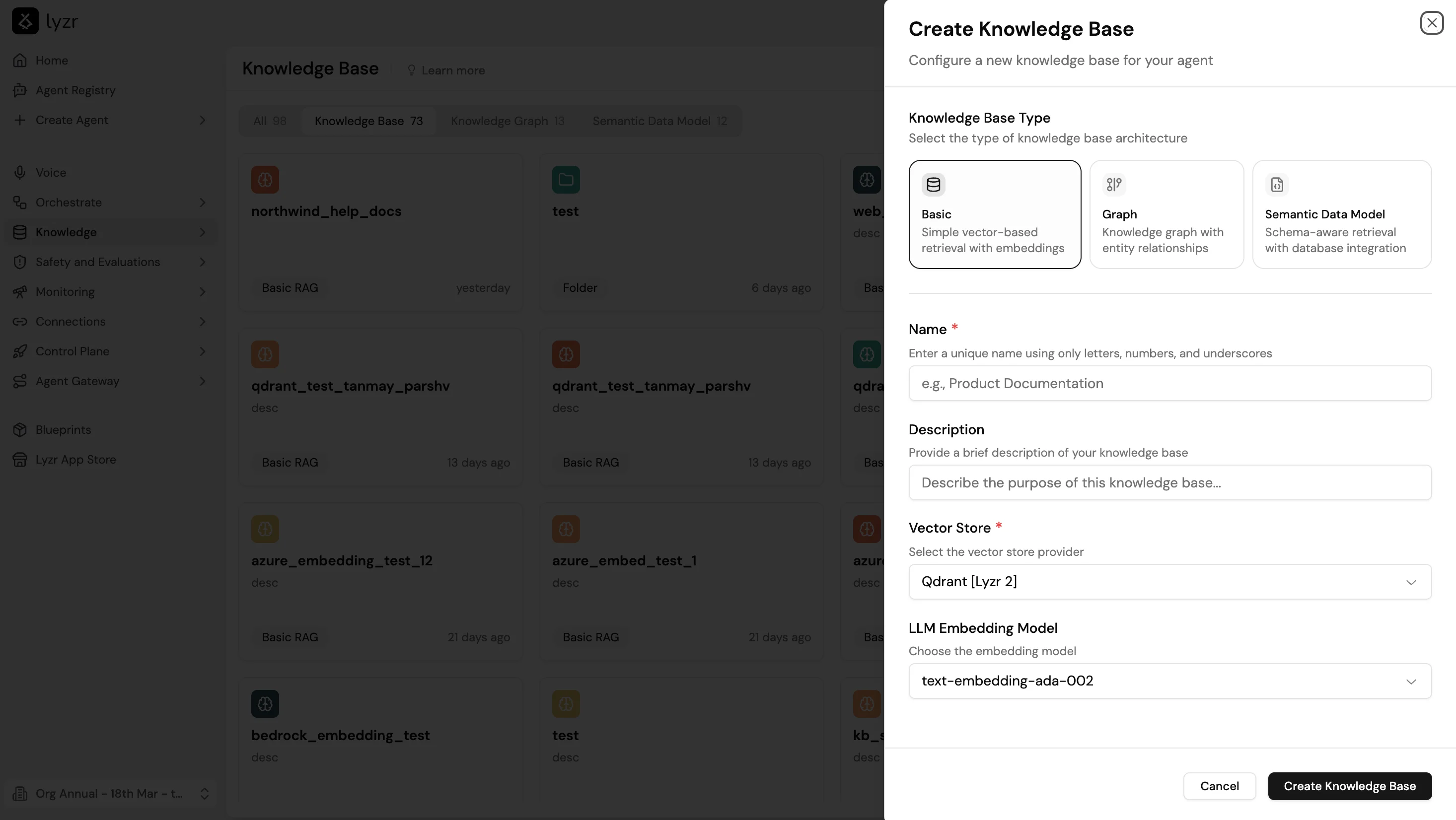
1. Go to **Knowledge Base** and select **+ New**.
2. Select **Basic** as the Knowledge Base Type. This option uses simple vector-based retrieval with embeddings.
3. Enter a **Name** (letters, numbers, and underscores only) and an optional **Description**.
4. Select a **Vector Store** and **LLM Embedding Model**.
5. Select **Create Knowledge Base**.
 6. Add content through file upload, text, URL, or live source.
7. Train the KB.
8. Attach it to an agent through the agent builder's **Knowledge Base** feature.
## Supported file types
* `.pdf`
* `.doc`
* `.docx`
* `.txt`
* Website URLs
## Upload limitations
| Limit | Value |
| ---------------- | ------------------------------------------------------------ |
| Files per upload | 5 |
| File size | Less than 15 MB each |
| Recommendation | Upload in batches and test retrieval quality between batches |
## Chunking strategy
Chunking controls how documents are split before embedding. Smaller chunks improve precision; larger chunks preserve context.
| Setting | Description |
| ---------------- | --------------------------------------------------------------------------------- |
| Chunk size | Maximum number of tokens in each chunk |
| Overlap | Number of tokens shared between adjacent chunks, preserving context at boundaries |
| Number of chunks | Maximum number of chunks returned per query |
## Retrieval types
| Type | Best for |
| --------------------------------------- | ----------------------------------------------------------- |
| Basic Retrieval | General vector similarity search |
| MMR (Maximal Marginal Relevance) | Reducing duplicate chunks while preserving relevance |
| HyDE (Hypothetical Document Embeddings) | Improving retrieval accuracy on open-ended or vague queries |
## Score threshold
The score threshold filters out chunks whose similarity score falls below a minimum value. Raising the threshold improves answer precision but may reduce recall on borderline queries. Start at the default and adjust based on test results.
## Playground Retrieval
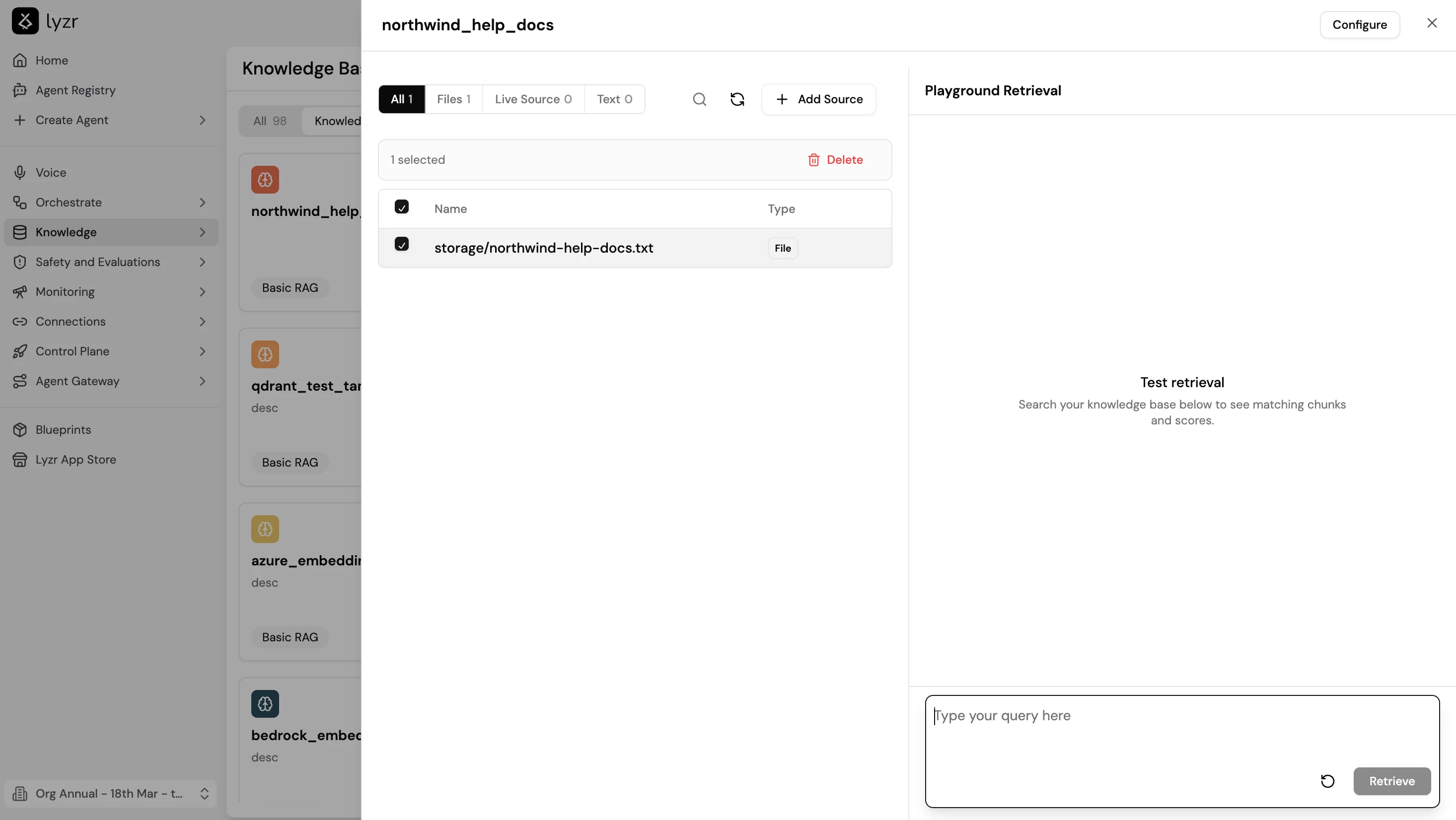
Once the KB is trained, open it and use the **Playground Retrieval** panel on the right to test retrieval before attaching it to an agent. Type a query in the input field and select **Retrieve** to see the matching chunks and their similarity scores. This lets you verify that the right content is surfacing for representative questions and catch chunking or configuration issues before doing a full agent deployment.
6. Add content through file upload, text, URL, or live source.
7. Train the KB.
8. Attach it to an agent through the agent builder's **Knowledge Base** feature.
## Supported file types
* `.pdf`
* `.doc`
* `.docx`
* `.txt`
* Website URLs
## Upload limitations
| Limit | Value |
| ---------------- | ------------------------------------------------------------ |
| Files per upload | 5 |
| File size | Less than 15 MB each |
| Recommendation | Upload in batches and test retrieval quality between batches |
## Chunking strategy
Chunking controls how documents are split before embedding. Smaller chunks improve precision; larger chunks preserve context.
| Setting | Description |
| ---------------- | --------------------------------------------------------------------------------- |
| Chunk size | Maximum number of tokens in each chunk |
| Overlap | Number of tokens shared between adjacent chunks, preserving context at boundaries |
| Number of chunks | Maximum number of chunks returned per query |
## Retrieval types
| Type | Best for |
| --------------------------------------- | ----------------------------------------------------------- |
| Basic Retrieval | General vector similarity search |
| MMR (Maximal Marginal Relevance) | Reducing duplicate chunks while preserving relevance |
| HyDE (Hypothetical Document Embeddings) | Improving retrieval accuracy on open-ended or vague queries |
## Score threshold
The score threshold filters out chunks whose similarity score falls below a minimum value. Raising the threshold improves answer precision but may reduce recall on borderline queries. Start at the default and adjust based on test results.
## Playground Retrieval
Once the KB is trained, open it and use the **Playground Retrieval** panel on the right to test retrieval before attaching it to an agent. Type a query in the input field and select **Retrieve** to see the matching chunks and their similarity scores. This lets you verify that the right content is surfacing for representative questions and catch chunking or configuration issues before doing a full agent deployment.
 ## Live Sources
Live Sources automatically sync content on a configurable frequency. When new content is detected, Lyzr adds the delta instead of re-ingesting everything.
Available for:
* **SharePoint**: syncs documents from selected SharePoint sites
* **Website**: crawls and re-indexes updated pages
* **Google Drive**: planned support
Minimum sync frequency is 1 hour.
## KB-as-a-Service
A trained Knowledge Base is also accessible as a standalone API endpoint, independent of any agent. This lets other services or agents built outside Lyzr Studio query the same KB directly, which is useful for shared knowledge repositories or multi-product deployments.
## Next steps
* [Build an agent in Studio](../agents/studio)
* [Knowledge Graph for relationship-based retrieval](studiokg)
* [Semantic Model for structured data queries](studiosem)
## Live Sources
Live Sources automatically sync content on a configurable frequency. When new content is detected, Lyzr adds the delta instead of re-ingesting everything.
Available for:
* **SharePoint**: syncs documents from selected SharePoint sites
* **Website**: crawls and re-indexes updated pages
* **Google Drive**: planned support
Minimum sync frequency is 1 hour.
## KB-as-a-Service
A trained Knowledge Base is also accessible as a standalone API endpoint, independent of any agent. This lets other services or agents built outside Lyzr Studio query the same KB directly, which is useful for shared knowledge repositories or multi-product deployments.
## Next steps
* [Build an agent in Studio](../agents/studio)
* [Knowledge Graph for relationship-based retrieval](studiokg)
* [Semantic Model for structured data queries](studiosem)