> ## Documentation Index
> Fetch the complete documentation index at: https://docs.lyzr.ai/llms.txt
> Use this file to discover all available pages before exploring further.
# Rate Limits
> Cap credit and token usage for users, agents, and sub-organizations.
Rate limits set credit and token caps for the organization and its managed entities: individual **users**, **agents**, or **sub-organizations**, over a rolling window (hourly, daily, and so on).
This is a finer-grained control than the sub-account credit limit in [Team Management](./team-management#sub-accounts), which caps a whole sub-account's spend for the billing cycle. Rate limits let you additionally cap a single noisy agent, a single user, or a single sub-organization, and can limit tokens as well as credits.
## Opening Rate Limits
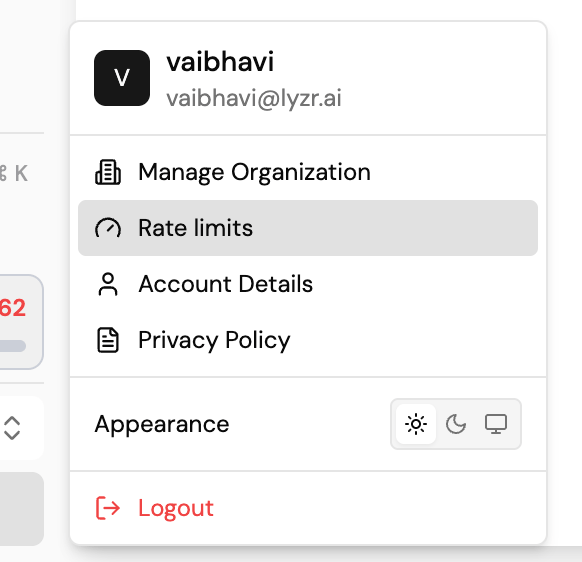
Click your avatar in the sidebar and select **Rate limits** from the account menu.
 ## Overview
The Rate Limits page shows a **Credits available** summary and a row of tabs that scope the view:
* **Overview**: an org-wide summary.
* **Sub-organizations**: rate limits scoped to individual sub-organizations.
* **Agents**: rate limits scoped to individual agents.
* **Users**: rate limits scoped to individual users.
Select **Refresh** to reload the latest usage, or **Add limit** to create a new rate limit.
## Overview
The Rate Limits page shows a **Credits available** summary and a row of tabs that scope the view:
* **Overview**: an org-wide summary.
* **Sub-organizations**: rate limits scoped to individual sub-organizations.
* **Agents**: rate limits scoped to individual agents.
* **Users**: rate limits scoped to individual users.
Select **Refresh** to reload the latest usage, or **Add limit** to create a new rate limit.
 ## Adding a rate limit
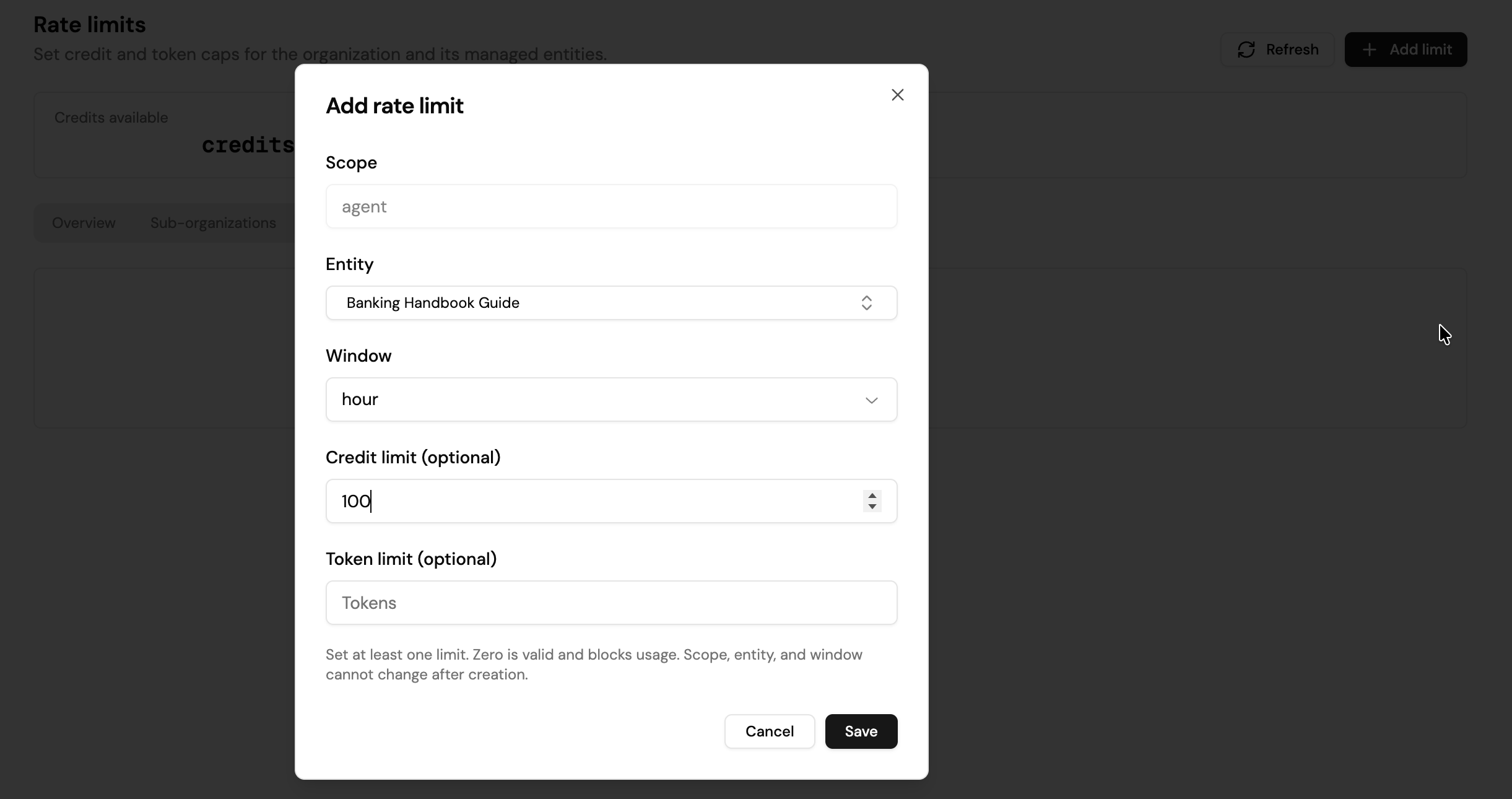
Select **Add limit** to open the **Add rate limit** modal:
| Field | What it does |
| ----------------------- | ------------------------------------------------------------------------ |
| Scope | What the limit applies to: **agent**, **user**, or **sub-organization**. |
| Entity | The specific agent, user, or sub-organization the limit applies to. |
| Window | The rolling period the limit resets on, for example **hour** or **day**. |
| Credit limit (optional) | The maximum credits the entity can consume within the window. |
| Token limit (optional) | The maximum tokens the entity can consume within the window. |
You must set at least one of Credit limit or Token limit. A limit of **0 is valid** and blocks all usage for that entity within the window. Once a rate limit is created, its **scope**, **entity**, and **window** are locked; to change them, delete the rate limit and create a new one.
## Viewing and managing rate limits
Each tab (Sub-organizations, Agents, Users) lists its active rate limits in a table:
| Column | What it shows |
| ------ | ------------------------------------------------------------------------------------- |
| Name | The user, agent, or sub-organization the limit applies to. |
| Window | The rolling reset period. |
| Limit | The configured credit and/or token cap. |
| Usage | Consumption so far against the limit for the current window, shown as a progress bar. |
| Resets | Time remaining until the window resets. |
| Status | Whether the limit is **Enabled** or **Disabled**. |
Use the edit (pencil) icon on a row to change its credit/token limits, or the delete (trash) icon to remove the rate limit entirely.
## Next steps
* [Team Management](./team-management): sub-account credit limits, member roles, and audit logs.
* [Roles & Permissions](./roles-permissions): who can manage rate limits.
## Adding a rate limit
Select **Add limit** to open the **Add rate limit** modal:
| Field | What it does |
| ----------------------- | ------------------------------------------------------------------------ |
| Scope | What the limit applies to: **agent**, **user**, or **sub-organization**. |
| Entity | The specific agent, user, or sub-organization the limit applies to. |
| Window | The rolling period the limit resets on, for example **hour** or **day**. |
| Credit limit (optional) | The maximum credits the entity can consume within the window. |
| Token limit (optional) | The maximum tokens the entity can consume within the window. |
You must set at least one of Credit limit or Token limit. A limit of **0 is valid** and blocks all usage for that entity within the window. Once a rate limit is created, its **scope**, **entity**, and **window** are locked; to change them, delete the rate limit and create a new one.
## Viewing and managing rate limits
Each tab (Sub-organizations, Agents, Users) lists its active rate limits in a table:
| Column | What it shows |
| ------ | ------------------------------------------------------------------------------------- |
| Name | The user, agent, or sub-organization the limit applies to. |
| Window | The rolling reset period. |
| Limit | The configured credit and/or token cap. |
| Usage | Consumption so far against the limit for the current window, shown as a progress bar. |
| Resets | Time remaining until the window resets. |
| Status | Whether the limit is **Enabled** or **Disabled**. |
Use the edit (pencil) icon on a row to change its credit/token limits, or the delete (trash) icon to remove the rate limit entirely.
## Next steps
* [Team Management](./team-management): sub-account credit limits, member roles, and audit logs.
* [Roles & Permissions](./roles-permissions): who can manage rate limits.