> ## Documentation Index
> Fetch the complete documentation index at: https://docs.lyzr.ai/llms.txt
> Use this file to discover all available pages before exploring further.
# Git for Agents
> Connect any Lyzr agent to a Git repository and manage its lifecycle with branches, pull requests, and controlled promotion to production.
Git for Agents connects an agent to a Git repository so its configuration lives in branches, the same way application code does. Each branch is an isolated line of the agent's configuration: instructions, model choice, and prompts. Changes move between branches through standard Git operations (commits, merges, and pull requests), and everything stays bi-directional, so changes made in Git and changes made in Studio remain in sync.
## Why connect an agent to Git
Lyzr natively provides [version control](/enterprise/agent-studio/control-plane/version-control) for every agent, but native versioning is linear: once an agent is live, your API key points to its latest version, so any change you save lands directly on the version production consumes. Linear versioning records history, but it cannot isolate experimentation from production.
With Git connected, production keeps running on one branch while you rewrite instructions, swap models, and test new prompts on another, with zero impact on live traffic. When you are confident in the changes, you promote them. See [Branching and Promotion](/enterprise/agent-studio/git-for-agents/branching-and-promotion) for that workflow.
## Prerequisites
You need a GitHub account and a personal access token (PAT) with repo permissions. If your organization uses GitHub Enterprise Server, you also need your GitHub Enterprise domain URL.
## Connecting a repository
Git can be connected to any agent, single or manager.
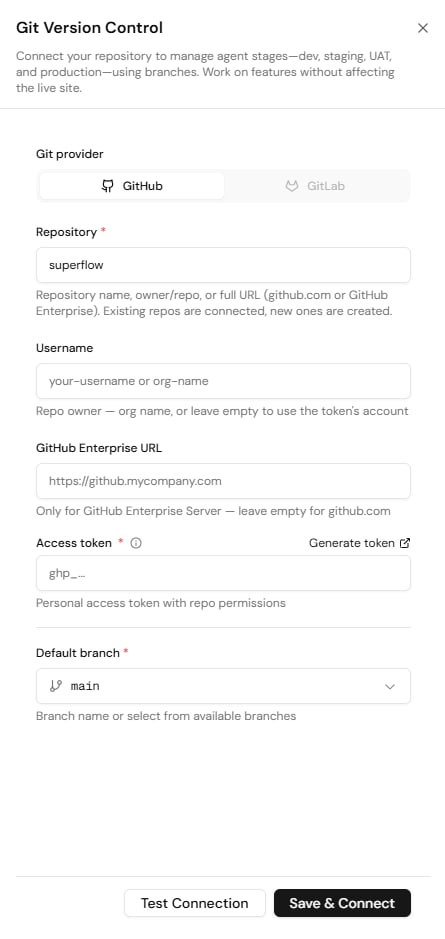 1. Open the agent in Agent Studio and select the **Git Connect** icon at the top right of the agent view.
2. Enter a **Repository** name, owner/repo, or full URL. If a repository with that name already exists it is connected; if not, Lyzr creates one for you.
3. Optionally enter a **Username** (an org or repo owner name). Leave it empty to use the token's account.
4. If your company uses GitHub Enterprise Server, enter your **GitHub Enterprise URL** so the token request resolves to the correct domain. Leave it empty for github.com.
5. Paste your **Access token**. Select **Generate token** to open GitHub and create a PAT if you do not have one.
6. Choose the **Default branch** to connect to.
7. Select **Test Connection** to verify the details, then select **Save & Connect**.
The agent is now connected to Git. By default you get access to the `main` branch.
## The Git menu
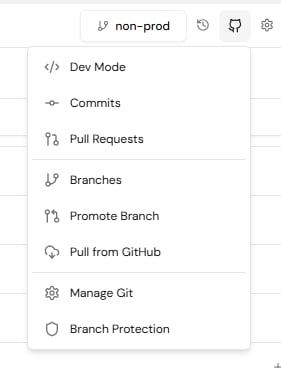
Once Git is enabled, a new icon with your GitHub URL appears at the top of the agent view. It opens the full set of Git options: **Commits**, **Pull Requests**, **Branches**, **Promote Branch**, **Pull from GitHub**, **Manage Git**, and **Branch Protection**. The current branch is shown next to the icon.
1. Open the agent in Agent Studio and select the **Git Connect** icon at the top right of the agent view.
2. Enter a **Repository** name, owner/repo, or full URL. If a repository with that name already exists it is connected; if not, Lyzr creates one for you.
3. Optionally enter a **Username** (an org or repo owner name). Leave it empty to use the token's account.
4. If your company uses GitHub Enterprise Server, enter your **GitHub Enterprise URL** so the token request resolves to the correct domain. Leave it empty for github.com.
5. Paste your **Access token**. Select **Generate token** to open GitHub and create a PAT if you do not have one.
6. Choose the **Default branch** to connect to.
7. Select **Test Connection** to verify the details, then select **Save & Connect**.
The agent is now connected to Git. By default you get access to the `main` branch.
## The Git menu
Once Git is enabled, a new icon with your GitHub URL appears at the top of the agent view. It opens the full set of Git options: **Commits**, **Pull Requests**, **Branches**, **Promote Branch**, **Pull from GitHub**, **Manage Git**, and **Branch Protection**. The current branch is shown next to the icon.
 ## Next steps
Create an experimentation branch and promote it to production when it is ready. The full workflow, including pull requests, direct merges, and commit restore, is covered in [Branching and Promotion](/enterprise/agent-studio/git-for-agents/branching-and-promotion).
## Next steps
Create an experimentation branch and promote it to production when it is ready. The full workflow, including pull requests, direct merges, and commit restore, is covered in [Branching and Promotion](/enterprise/agent-studio/git-for-agents/branching-and-promotion).