> ## Documentation Index
> Fetch the complete documentation index at: https://docs.lyzr.ai/llms.txt
> Use this file to discover all available pages before exploring further.
# Branching and Promotion
> Create isolated branches to experiment on an agent, then promote changes to production through a pull request or a direct merge.
Once an agent is [connected to Git](/enterprise/agent-studio/git-for-agents/overview), you can create branches to experiment safely and promote changes to production when they are ready. A common setup uses two branches: `main` for production and `non-prod` for experimentation. Production keeps running on `main` untouched, while on `non-prod` you can rewrite instructions, swap models, and test new prompts with no impact on live traffic.
## Creating a branch
1. Select the GitHub icon at the top of the agent view to open the Git menu.
2. Select **Branches**, then **Create Branch**.
3. Pick the source branch the new branch should be created from, and give it a name (for example, `non-prod`).
As soon as the new branch is created, the agent automatically switches to it, so you can start experimenting right away. You can create as many branches as you need.
## Switching branches
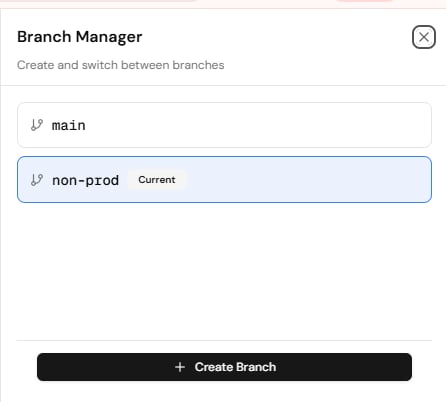
The Branch Manager lists every branch and marks the one you are currently on. Select any branch to switch the agent view to it; the branch name shown at the top of the agent updates to match.
 ## Promoting a branch
When you are happy with what is on your lower branch, promote it.
1. Open the Git menu and select **Promote Branch**.
2. Set **From** and **To**, for example from `non-prod` to `main`.
3. Choose how to promote: open a pull request or merge directly.
4. Give the promotion a title and an optional description of what changed, then select **Create Pull Request** (or merge).
## Promoting a branch
When you are happy with what is on your lower branch, promote it.
1. Open the Git menu and select **Promote Branch**.
2. Set **From** and **To**, for example from `non-prod` to `main`.
3. Choose how to promote: open a pull request or merge directly.
4. Give the promotion a title and an optional description of what changed, then select **Create Pull Request** (or merge).
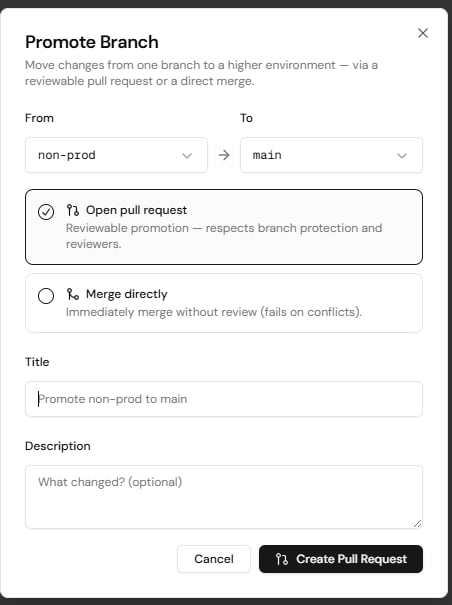 The two promotion options serve different situations. **Open pull request** is the safer, process-driven path: an approver reviews the pull request in Git and merges it, conflicts can be resolved during review, and the promotion respects branch protection rules and reviewers. **Merge directly** is the fastest path to production: it merges immediately without review and fails if there are conflicts, so it is best when changes are small and low-risk.
Sync is bi-directional. Whatever you change in Git and whatever you change in Studio stay in sync, in both directions.
## Commit history and restore
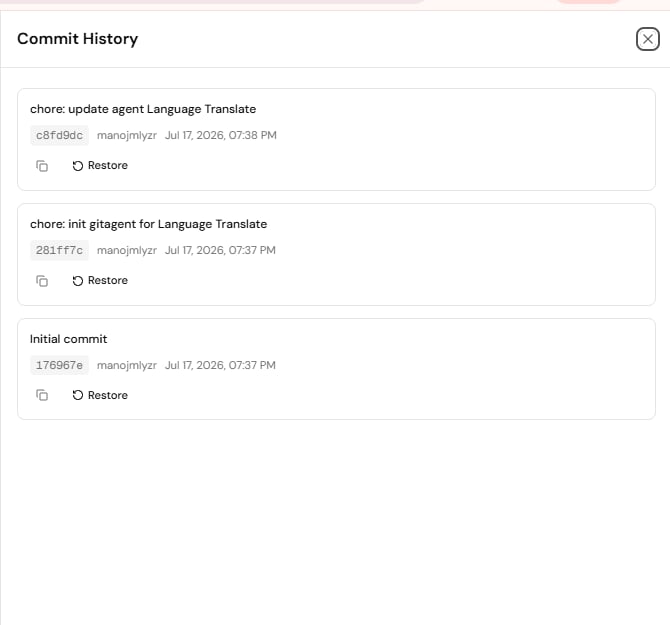
Select **Commits** in the Git menu to see the full history for the agent. Every commit is tracked with its hash, author, and timestamp, and any commit can be restored with a single click using **Restore**.
The two promotion options serve different situations. **Open pull request** is the safer, process-driven path: an approver reviews the pull request in Git and merges it, conflicts can be resolved during review, and the promotion respects branch protection rules and reviewers. **Merge directly** is the fastest path to production: it merges immediately without review and fails if there are conflicts, so it is best when changes are small and low-risk.
Sync is bi-directional. Whatever you change in Git and whatever you change in Studio stay in sync, in both directions.
## Commit history and restore
Select **Commits** in the Git menu to see the full history for the agent. Every commit is tracked with its hash, author, and timestamp, and any commit can be restored with a single click using **Restore**.
 ## Pulling remote changes
If changes were made directly in the Git repository, select **Manage Git** and then **Pull from GitHub** to bring the latest remote changes into the agent.
## Branch protection
**Branch Protection** in the Git menu lets you protect a branch so that promotions into it go through review. Pull requests opened from **Promote Branch** respect these protection rules and reviewers.
## Pulling remote changes
If changes were made directly in the Git repository, select **Manage Git** and then **Pull from GitHub** to bring the latest remote changes into the agent.
## Branch protection
**Branch Protection** in the Git menu lets you protect a branch so that promotions into it go through review. Pull requests opened from **Promote Branch** respect these protection rules and reviewers.