> ## Documentation Index
> Fetch the complete documentation index at: https://docs.lyzr.ai/llms.txt
> Use this file to discover all available pages before exploring further.
# Webhook Trigger
> Give an agent a secure URL so external systems can run it with an HTTP POST request.
A webhook trigger gives an agent its own endpoint URL. When an external system, such as a ticketing tool, a form, a CI pipeline, or GitHub, sends a `POST` request to that URL, the agent runs with the request's JSON body as its message. Requests must be signed with the webhook's secret key, so only systems that hold the secret can trigger the agent.
Use a webhook when the agent should react to an event as it happens. To run an agent at fixed times instead, use the [Scheduler](/enterprise/agent-studio/automation/scheduler).
## Setting up a webhook
Open the agent in Agent Builder and open its webhook settings. Once the webhook is created, the **Webhook Configuration** panel shows its details.
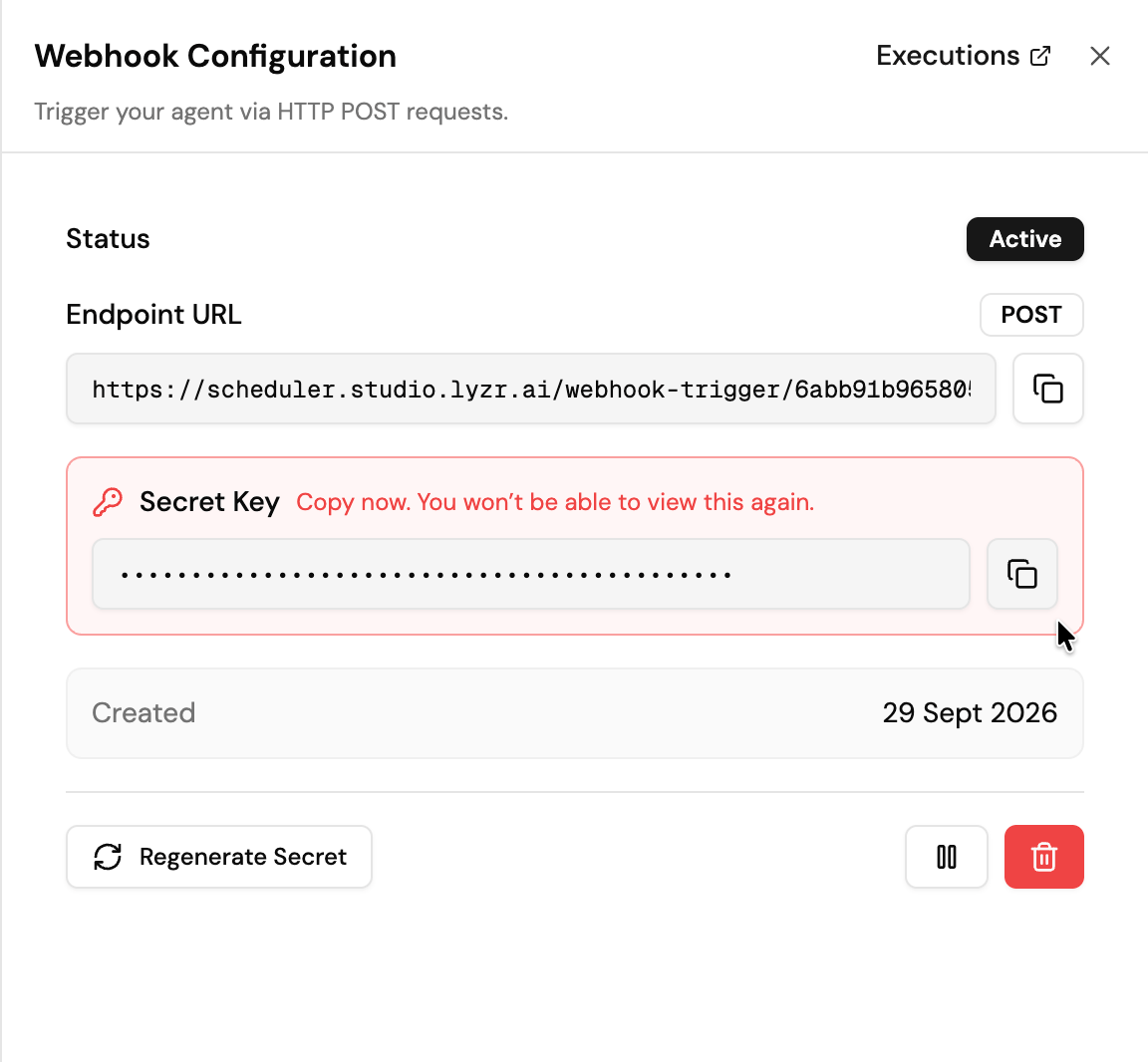 | Field | What it shows |
| - | - |
| **Status** | **Active** when the webhook accepts requests. A paused webhook ignores incoming requests. |
| **Endpoint URL** | The URL external systems call with `POST`. Use the copy button to copy it. |
| **Secret Key** | The key used to sign requests. |
| **Created** | When the webhook was created. |
The secret key is shown only once. Copy it and store it somewhere safe, such as your secrets manager, before closing the panel. If you lose it, select **Regenerate Secret** to issue a new one.
Each agent has one webhook.
## Calling the webhook
Send a `POST` request to the endpoint URL with a JSON body and an `X-Webhook-Signature` header. The signature is `sha256=` followed by the HMAC-SHA256 of the raw request body, using the secret key.
```bash theme={null}
BODY='{"ticket_id":48213,"subject":"Refund not received","priority":"high"}'
SIG=$(printf '%s' "$BODY" | openssl dgst -sha256 -hmac "$WEBHOOK_SECRET" | sed 's/^.* //')
curl -X POST "$WEBHOOK_URL" \
-H "Content-Type: application/json" \
-H "X-Webhook-Signature: sha256=$SIG" \
-d "$BODY"
```
The endpoint responds with `202` right away and the agent runs in the background. Requests with a missing or incorrect signature are rejected with `401`.
For Python and Node.js examples, see [Trigger Webhook](/enterprise/api/webhooks/webhook-trigger/trigger).
### Connecting GitHub
GitHub signs its webhook deliveries in the same format, so you can point a GitHub webhook straight at the agent:
1. In your repository, go to **Settings > Webhooks > Add webhook**.
2. Set **Payload URL** to the endpoint URL.
3. Set **Content type** to `application/json`.
4. Set **Secret** to the webhook's secret key.
## Managing the webhook
| Control | What it does |
| - | - |
| **Regenerate Secret** | Issues a new secret key. The old key stops working, so update every system that calls the webhook with the new one. Use this if the key is lost or exposed. |
| **Pause** | Stops the webhook from triggering the agent. The URL and secret stay the same, so you can resume later without reconfiguring callers. |
| **Delete** | Removes the webhook permanently. Calls to the endpoint URL stop working. |
## Monitoring runs
Select **Executions** in the panel header to see every webhook-triggered run, including whether it succeeded, the payload it received, and the agent's response or error.
## Managing webhooks with the API
You can create, pause, resume, and delete webhooks, regenerate secrets, and read execution logs over REST. See the [Agent Webhooks API](/enterprise/api/webhooks/agent-webhooks/create).
| Field | What it shows |
| - | - |
| **Status** | **Active** when the webhook accepts requests. A paused webhook ignores incoming requests. |
| **Endpoint URL** | The URL external systems call with `POST`. Use the copy button to copy it. |
| **Secret Key** | The key used to sign requests. |
| **Created** | When the webhook was created. |
The secret key is shown only once. Copy it and store it somewhere safe, such as your secrets manager, before closing the panel. If you lose it, select **Regenerate Secret** to issue a new one.
Each agent has one webhook.
## Calling the webhook
Send a `POST` request to the endpoint URL with a JSON body and an `X-Webhook-Signature` header. The signature is `sha256=` followed by the HMAC-SHA256 of the raw request body, using the secret key.
```bash theme={null}
BODY='{"ticket_id":48213,"subject":"Refund not received","priority":"high"}'
SIG=$(printf '%s' "$BODY" | openssl dgst -sha256 -hmac "$WEBHOOK_SECRET" | sed 's/^.* //')
curl -X POST "$WEBHOOK_URL" \
-H "Content-Type: application/json" \
-H "X-Webhook-Signature: sha256=$SIG" \
-d "$BODY"
```
The endpoint responds with `202` right away and the agent runs in the background. Requests with a missing or incorrect signature are rejected with `401`.
For Python and Node.js examples, see [Trigger Webhook](/enterprise/api/webhooks/webhook-trigger/trigger).
### Connecting GitHub
GitHub signs its webhook deliveries in the same format, so you can point a GitHub webhook straight at the agent:
1. In your repository, go to **Settings > Webhooks > Add webhook**.
2. Set **Payload URL** to the endpoint URL.
3. Set **Content type** to `application/json`.
4. Set **Secret** to the webhook's secret key.
## Managing the webhook
| Control | What it does |
| - | - |
| **Regenerate Secret** | Issues a new secret key. The old key stops working, so update every system that calls the webhook with the new one. Use this if the key is lost or exposed. |
| **Pause** | Stops the webhook from triggering the agent. The URL and secret stay the same, so you can resume later without reconfiguring callers. |
| **Delete** | Removes the webhook permanently. Calls to the endpoint URL stop working. |
## Monitoring runs
Select **Executions** in the panel header to see every webhook-triggered run, including whether it succeeded, the payload it received, and the agent's response or error.
## Managing webhooks with the API
You can create, pause, resume, and delete webhooks, regenerate secrets, and read execution logs over REST. See the [Agent Webhooks API](/enterprise/api/webhooks/agent-webhooks/create).