> ## Documentation Index
> Fetch the complete documentation index at: https://docs.lyzr.ai/llms.txt
> Use this file to discover all available pages before exploring further.
# Manager Agent in Lyzr Agents
## 🧠 Manager Agent in Studio
The **Manager Agent** architecture in Lyzr allows for modular, composable workflows, where one agent (the manager) coordinates and delegates subtasks to multiple other specialized agents — known as *managed agents*. This setup enables powerful automations by distributing responsibilities across a team of purpose-built agents.
***
## 💡 Example Use Case
In a **Fitness Assistant** agent setup:
* The **main agent** generates personalized fitness plans.
* A **managed agent** called `Mail Generator` automatically sends the generated plans to users via email.
This delegation enables better maintainability, modularity, and scalability.
***
## 🔧 How It Works
### 🖥️ Step 1: Toggle Manager Agent
When creating or editing an agent in Studio, you'll find an option to enable the **Manager Agent** capability.
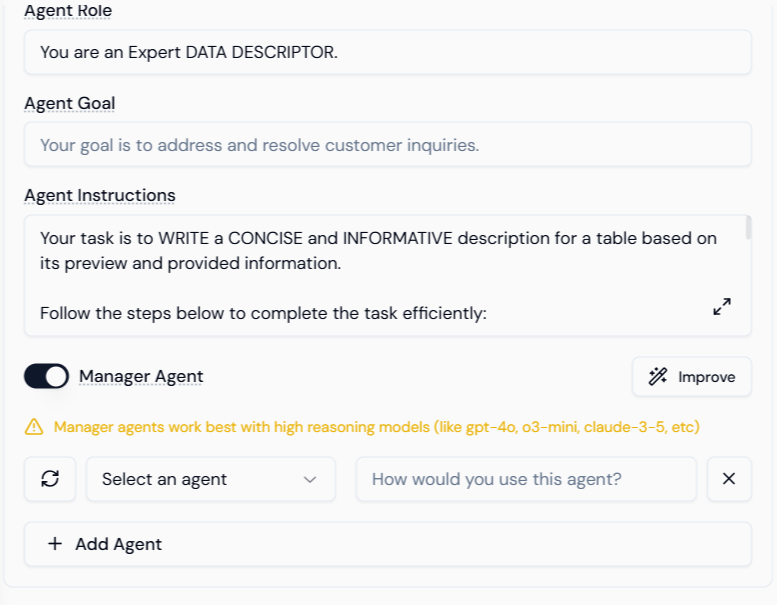 Toggling this allows the agent to orchestrate and manage one or more sub-agents as part of its execution logic.
***
### 🧩 Step 2: Add Managed Agents
Once the toggle is enabled, you can start adding managed agents to the configuration.
Toggling this allows the agent to orchestrate and manage one or more sub-agents as part of its execution logic.
***
### 🧩 Step 2: Add Managed Agents
Once the toggle is enabled, you can start adding managed agents to the configuration.
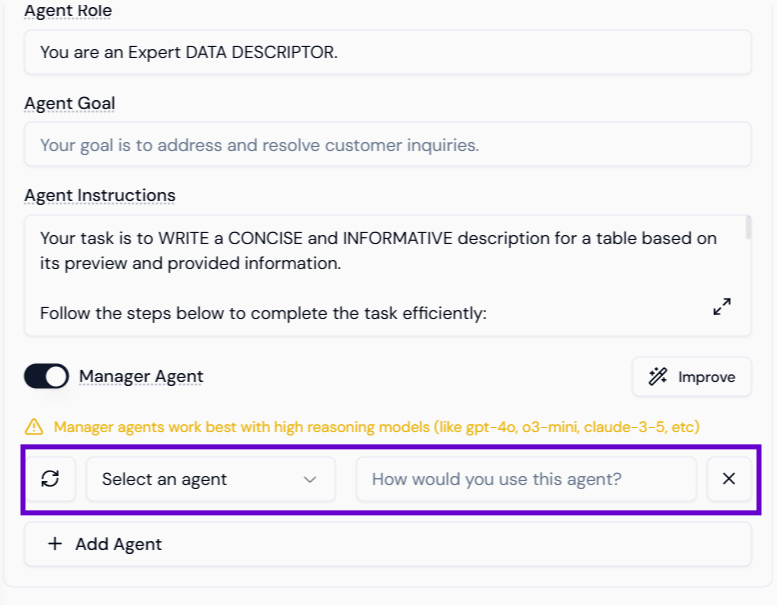 For each managed agent, provide the following:
* **Agent Name** – for easy reference.
* **Usage Description** – define when and how the manager should use this agent.
This usage description acts as a **system prompt** that guides how the Manager Agent interacts with each sub-agent.
***
### ➕ Step 3: Add Multiple Managed Agents
You can add more than one managed agent. The manager will dynamically select and trigger them based on the conversation context and the logic you’ve described.
For each managed agent, provide the following:
* **Agent Name** – for easy reference.
* **Usage Description** – define when and how the manager should use this agent.
This usage description acts as a **system prompt** that guides how the Manager Agent interacts with each sub-agent.
***
### ➕ Step 3: Add Multiple Managed Agents
You can add more than one managed agent. The manager will dynamically select and trigger them based on the conversation context and the logic you’ve described.
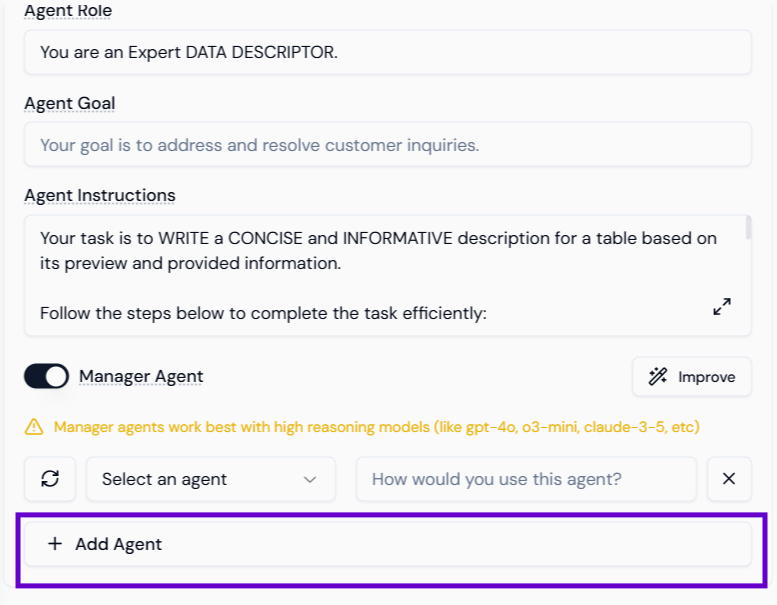 This allows building **multi-step workflows** such as:
* Data extraction → report generation → email dispatch
* Summarization → notification → feedback logging
***
## 🧱 JSON Configuration Reference
When exported via API, the managed agents appear in the agent JSON like this:
```json theme={null}
"managed_agents": [
{
"id": "67f632f43e4bcae4a5cfd109",
"name": "Mail Generator",
"usage_description": "Generate a proper diet plan and mail it to the user, whenever the user starts to chat ask for their mail ID 1st"
}
]
```
| Field | Type | Description |
| ------------------- | ------ | ------------------------------------------------------------- |
| `id` | string | Unique identifier for the sub-agent (from the Agent Database) |
| `name` | string | Friendly name for clarity |
| `usage_description` | string | Detailed instruction to guide invocation logic |
## Summary
| Step | Action |
| ---- | ------------------------------------------------------- |
| 1. | Enable the Manager Agent toggle in Studio |
| 2. | Add one or more sub-agents with usage instructions |
| 3. | Use your Manager Agent to orchestrate complex workflows |
With this setup, you can orchestrate intelligent, multi-agent systems that feel cohesive, responsive, and easy to maintain — all through a visual no-code interface.
This allows building **multi-step workflows** such as:
* Data extraction → report generation → email dispatch
* Summarization → notification → feedback logging
***
## 🧱 JSON Configuration Reference
When exported via API, the managed agents appear in the agent JSON like this:
```json theme={null}
"managed_agents": [
{
"id": "67f632f43e4bcae4a5cfd109",
"name": "Mail Generator",
"usage_description": "Generate a proper diet plan and mail it to the user, whenever the user starts to chat ask for their mail ID 1st"
}
]
```
| Field | Type | Description |
| ------------------- | ------ | ------------------------------------------------------------- |
| `id` | string | Unique identifier for the sub-agent (from the Agent Database) |
| `name` | string | Friendly name for clarity |
| `usage_description` | string | Detailed instruction to guide invocation logic |
## Summary
| Step | Action |
| ---- | ------------------------------------------------------- |
| 1. | Enable the Manager Agent toggle in Studio |
| 2. | Add one or more sub-agents with usage instructions |
| 3. | Use your Manager Agent to orchestrate complex workflows |
With this setup, you can orchestrate intelligent, multi-agent systems that feel cohesive, responsive, and easy to maintain — all through a visual no-code interface.