> ## Documentation Index
> Fetch the complete documentation index at: https://docs.lyzr.ai/llms.txt
> Use this file to discover all available pages before exploring further.
# Agent API
The Lyzr Studio **Agent API** provides a programmatic interface to interact with your deployed Lyzr Agents. This allows you to integrate your agents into external applications, services, or custom workflows, enabling seamless communication and automation.
## Accessing the Agent API
To access the API details for a specific agent, navigate to your agent's configuration within Lyzr Studio. You will find an **"Agent API"** button, which provides the necessary endpoints and instructions for integration.
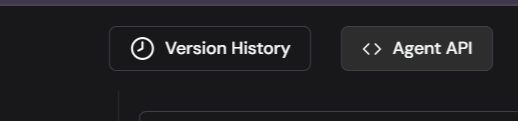 Clicking this button will typically reveal information such as your API key, agent endpoint URL, and example request/response structures.
## API Request Body
When making requests to your Lyzr Agent API, you will typically send a JSON payload in the request body. The exact structure can vary based on the agent's configuration and its expected inputs. A common structure involves passing a `query` or `input` field. When interacting with a **manager agent** (an agent designed to orchestrate or utilize other agents), you must also include details about these **managed agents** within your API call.
### Specifying Managed Agents for Manager Agents
The `managed_agents` array within the API body is crucial when you are interacting with a **manager agent**. This array explicitly lists the sub-agents that the manager agent has access to and can utilize to fulfill the given `query`. It informs the manager agent about the specific tools (other agents) at its disposal, including their unique identifiers and descriptive information.
The `managed_agents` array is a list of JSON objects, where each object represents a sub-agent available to the manager agent, as shown below:
Clicking this button will typically reveal information such as your API key, agent endpoint URL, and example request/response structures.
## API Request Body
When making requests to your Lyzr Agent API, you will typically send a JSON payload in the request body. The exact structure can vary based on the agent's configuration and its expected inputs. A common structure involves passing a `query` or `input` field. When interacting with a **manager agent** (an agent designed to orchestrate or utilize other agents), you must also include details about these **managed agents** within your API call.
### Specifying Managed Agents for Manager Agents
The `managed_agents` array within the API body is crucial when you are interacting with a **manager agent**. This array explicitly lists the sub-agents that the manager agent has access to and can utilize to fulfill the given `query`. It informs the manager agent about the specific tools (other agents) at its disposal, including their unique identifiers and descriptive information.
The `managed_agents` array is a list of JSON objects, where each object represents a sub-agent available to the manager agent, as shown below:
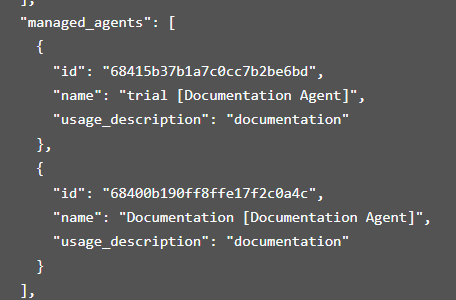 Each object within the `managed_agents` array typically contains the following fields:
* **`id`** (String):
* **Purpose**: This is the unique identifier for the managed sub-agent. It's an internal ID generated by Lyzr Studio and is essential for the manager agent to correctly reference and invoke the specific sub-agent.
* **How to Obtain**: You can find this ID in the Lyzr Studio interface when configuring agents or by inspecting API responses that list available agents.
* **Example**: `"68415b37b1a7c0cc7b2be6bd"`
* **`name`** (String):
* **Purpose**: A human-readable name for the managed sub-agent. This name helps in identifying the agent in logs, debugging, and understanding its role. It often includes a descriptive tag like `[Documentation Agent]`.
* **Example**: `"trial [Documentation Agent]"` or `"Documentation [Documentation Agent]"`
* **`usage_description`** (String):
* **Purpose**: A brief description of what the managed sub-agent does or what its primary function is. This description helps the manager agent decide which sub-agent is most appropriate for a given task or part of the overall query.
* **Example**: `"documentation"`
By providing the `managed_agents` array in your API request to a manager agent, you enable it to intelligently select and leverage its integrated sub-agents, leading to more robust and capable AI applications that can handle diverse and complex tasks.
***
Each object within the `managed_agents` array typically contains the following fields:
* **`id`** (String):
* **Purpose**: This is the unique identifier for the managed sub-agent. It's an internal ID generated by Lyzr Studio and is essential for the manager agent to correctly reference and invoke the specific sub-agent.
* **How to Obtain**: You can find this ID in the Lyzr Studio interface when configuring agents or by inspecting API responses that list available agents.
* **Example**: `"68415b37b1a7c0cc7b2be6bd"`
* **`name`** (String):
* **Purpose**: A human-readable name for the managed sub-agent. This name helps in identifying the agent in logs, debugging, and understanding its role. It often includes a descriptive tag like `[Documentation Agent]`.
* **Example**: `"trial [Documentation Agent]"` or `"Documentation [Documentation Agent]"`
* **`usage_description`** (String):
* **Purpose**: A brief description of what the managed sub-agent does or what its primary function is. This description helps the manager agent decide which sub-agent is most appropriate for a given task or part of the overall query.
* **Example**: `"documentation"`
By providing the `managed_agents` array in your API request to a manager agent, you enable it to intelligently select and leverage its integrated sub-agents, leading to more robust and capable AI applications that can handle diverse and complex tasks.
***