> ## Documentation Index
> Fetch the complete documentation index at: https://docs.lyzr.ai/llms.txt
> Use this file to discover all available pages before exploring further.
# Connecting Agents to Databases via Data Query
Lyzr Agents can directly connect to databases, understand schema details, and retrieve insights in **natural language** using the **Data Query** feature.
This feature acts as a bridge between raw relational data and AI-consumable knowledge, by **enriching structured tables with semantic context**. Essentially, it transforms data into a format that both AI models and humans can interpret meaningfully.
## 🚀 High-Level Workflow
The process of connecting an Agent to your data involves these steps:
1. **Connect to a Database:** Establish a connection to your desired data source.
2. **Create a Semantic Model:** Define the semantic context for your chosen tables.
3. **Create an Agent and Link the Semantic Model:** Enable the Data Query feature on an Agent and connect it to the Semantic Model.
***
### Conceptual Overview
The **Semantic Model** in Lyzr is a system designed to enable intelligent understanding, documentation, and utilization of structured tabular data (such as database tables) in AI workflows. It acts as a bridge between raw relational data and **human-readable, AI-consumable knowledge** by semantically enriching tables with detailed context.
### What is a Semantic Model?
A Semantic Model adds **meaning and context** to structured data by attaching:
* **Table-level descriptions:** High-level summaries that describe what a table represents.
* **Column-level metadata:** Detailed natural language explanations for each column’s purpose and data type.
* **Data previews:** Sample rows that provide real-world context to help AI systems and humans better understand usage.
By embedding this enriched information into a vector store, the Semantic Model enables more powerful:
* Retrieval-Augmented Generation (RAG) flows
* Search and documentation agents
* Natural language interfaces over data
> 💡 **Tip:** Avoid selecting an entire database (especially if it has 100+ tables). This can cause context overload, slower responses, and potential hallucinations. Instead, choose only the relevant tables.
### Why Use Semantic Modeling?
Traditional databases lack human-centric explanations. This creates challenges for:
* **Developers:** Slower schema understanding
* **AI models:** Less accurate data-driven responses
* **Business users:** Difficulty interacting with structured data
The Semantic Model solves this by providing clarity, structure, and semantic context:
1. Generating **semantic documentation automatically** using LLMs.
2. Structuring the output for both human consumption and AI workflows.
3. Saving the enhanced information in a vectorized format for fast and relevant retrieval.
### Core Workflow
1. **Input Source:** A database table with rows and schema is provided as input.
2. **LLM-Powered Inference:** A language model reviews table structure and sample data to generate descriptions.
3. **Semantic Description Output:**
* What the table is about
* What each column represents
* How the table connects to business or analytical use cases
4. **Storage & Retrieval:**
* These semantic blocks are embedded and stored in a **vector database**.
* Future retrievals (like question answering or agent planning) can now pull contextually rich, accurate descriptions.
### Components of the Semantic Model
| Component | Description |
| :-------------------- | :------------------------------------------------------------------------------------ |
| **Table Name** | The identifier of the dataset |
| **Table Description** | A high-level explanation of the table’s content and intent |
| **Columns** | A list of column names, each paired with a natural language description and data type |
| **Preview Records** | Optional rows from the table used for contextual grounding |
| RAG Config | Configuration used to generate or retrieve this semantic documentation |
| Task Handling | For large datasets, semantic documentation can be generated asynchronously |
### Benefits
* **Improved Discoverability:** Semantic metadata makes it easier to search and explore datasets.
* **Agent Integration:** Documentation agents and RAG models can use this metadata to answer user queries with high precision.
* **Auto-Documentation:** Automatically generated explanations save time for data engineers and analysts.
* **Natural Language Access:** Even non-technical users can query data through AI using the semantic layer as a knowledge base.
The Semantic Model ensures that your structured data is not just readable, but **meaningful and navigable by both humans and machines**. It turns flat schemas into rich knowledge representations that power the future of AI-driven data interfaces.
***
## Step-by-Step Guide
The Lyzr Studio’s **Semantic Model** enables intelligent querying of structured data like databases or CSVs using natural language.
### 1. Connect to Your Database (Supported Data Sources)
Lyzr supports multiple database connections. Refer to the full list here: \[Data Connectors Page URL]
* Navigate to **Data Connectors**.
* Select your desired **database type** (e.g., PostgreSQL, MySQL).
* Enter your credentials and save the connection.
 ### 2. Choose Knowledge Base Type
When creating a new Knowledge Base:
* Go to **Knowledge Base** → Click **Create New**.
* Select **Semantic Model** from the list of KB types.
### 2. Choose Knowledge Base Type
When creating a new Knowledge Base:
* Go to **Knowledge Base** → Click **Create New**.
* Select **Semantic Model** from the list of KB types.
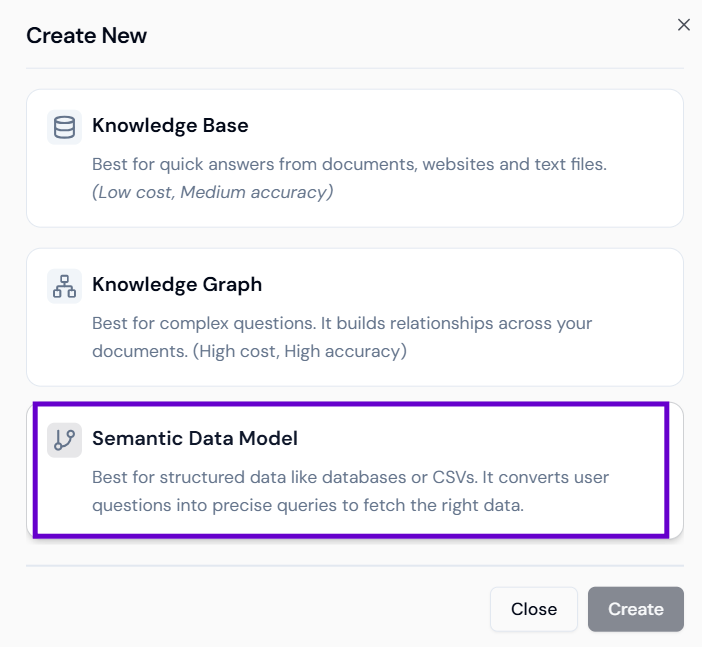 This type is specifically designed for structured data sources like PostgreSQL, MySQL, and CSV files. It activates Text-to-SQL capabilities and schema-based reasoning.
### 2. Connect to Your Database (Supported Data Sources)
Lyzr supports multiple database connections. Refer to the full list here: \[Data Connectors Page URL]
* Navigate to **Data Connectors**.
* Select your desired **database type** (e.g., PostgreSQL, MySQL).
* Enter your credentials and save the connection.
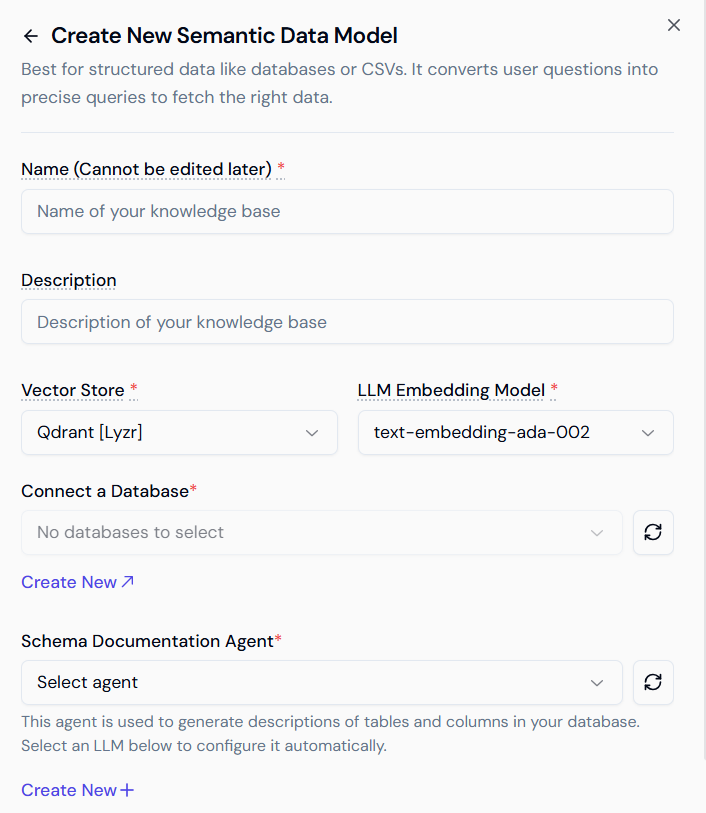
### 3. Generate Schema Documentation
* Fill in the required fields and select your connected database.
* At the bottom, you’ll see the **Schema Documentation Agent** section.
* If it’s your first time, click **Create New**, fill in the required details, and submit. This agent **automatically generates table and column descriptions** using LLMs, transforming raw data into AI-readable knowledge.
* **Table Descriptions**: What each table represents in plain English.
* **Column Metadata**: Natural language explanations for column names and data types.
* **Sample Records**: A few representative rows to provide grounding.
### 4. Configure Tables
* Click **Create Semantic Model**.
* You’ll see a list of tables in your database.
* Select tables one by one and click **Configure**.
* Review and edit auto-generated descriptions for tables and columns.
* Click **Save** once all required tables are configured.
### 5. Connect the Semantic Model to an Agent
* Go to the **Agents page** (from the sidebar).
* Create a new agent or edit an existing one.
* Enable the **Data Query** feature.
* Select your newly created **Semantic Model** from the dropdown.
### Result: Query Structured Data via AI
Your agent is now ready to:
* **Understand user queries** in natural language.
* **Convert them into SQL queries** (e.g., “Get top 10 customers by revenue” is converted into executable SQL).
* **Return responses** in a human-readable format.
* Agents retrieve actual rows from your database or uploaded CSVs.
***
## Summary
| Feature | Description |
| :--------------------------- | :--------------------------------------------------------------------- |
| **Structured Data Support** | Connect live databases (PostgreSQL, MySQL, etc.) or structured CSVs. |
| **AI-Powered Documentation** | Auto-generate table/column descriptions using LLMs. |
| **Text-to-SQL Enabled** | Agents can query data using natural language. |
| **Schema Agent Integration** | Deepens understanding of data context and boosts AI accuracy. |
| **Ideal Use Case** | For analytics, operations, sales, or any SQL-accessible business data. |
With the **Semantic Model**, Lyzr bridges the gap between raw relational databases and intuitive, natural language interfaces — letting teams unlock insights from structured data with ease.
Would you like me to elaborate on the benefits of using a Semantic Model for AI Agents?
This type is specifically designed for structured data sources like PostgreSQL, MySQL, and CSV files. It activates Text-to-SQL capabilities and schema-based reasoning.
### 2. Connect to Your Database (Supported Data Sources)
Lyzr supports multiple database connections. Refer to the full list here: \[Data Connectors Page URL]
* Navigate to **Data Connectors**.
* Select your desired **database type** (e.g., PostgreSQL, MySQL).
* Enter your credentials and save the connection.
### 3. Generate Schema Documentation
* Fill in the required fields and select your connected database.
* At the bottom, you’ll see the **Schema Documentation Agent** section.
* If it’s your first time, click **Create New**, fill in the required details, and submit. This agent **automatically generates table and column descriptions** using LLMs, transforming raw data into AI-readable knowledge.
* **Table Descriptions**: What each table represents in plain English.
* **Column Metadata**: Natural language explanations for column names and data types.
* **Sample Records**: A few representative rows to provide grounding.
### 4. Configure Tables
* Click **Create Semantic Model**.
* You’ll see a list of tables in your database.
* Select tables one by one and click **Configure**.
* Review and edit auto-generated descriptions for tables and columns.
* Click **Save** once all required tables are configured.
### 5. Connect the Semantic Model to an Agent
* Go to the **Agents page** (from the sidebar).
* Create a new agent or edit an existing one.
* Enable the **Data Query** feature.
* Select your newly created **Semantic Model** from the dropdown.
### Result: Query Structured Data via AI
Your agent is now ready to:
* **Understand user queries** in natural language.
* **Convert them into SQL queries** (e.g., “Get top 10 customers by revenue” is converted into executable SQL).
* **Return responses** in a human-readable format.
* Agents retrieve actual rows from your database or uploaded CSVs.
***
## Summary
| Feature | Description |
| :--------------------------- | :--------------------------------------------------------------------- |
| **Structured Data Support** | Connect live databases (PostgreSQL, MySQL, etc.) or structured CSVs. |
| **AI-Powered Documentation** | Auto-generate table/column descriptions using LLMs. |
| **Text-to-SQL Enabled** | Agents can query data using natural language. |
| **Schema Agent Integration** | Deepens understanding of data context and boosts AI accuracy. |
| **Ideal Use Case** | For analytics, operations, sales, or any SQL-accessible business data. |
With the **Semantic Model**, Lyzr bridges the gap between raw relational databases and intuitive, natural language interfaces — letting teams unlock insights from structured data with ease.
Would you like me to elaborate on the benefits of using a Semantic Model for AI Agents?