> ## Documentation Index
> Fetch the complete documentation index at: https://docs.lyzr.ai/llms.txt
> Use this file to discover all available pages before exploring further.
# Classic Knowledge Base
Lyzr Studio’s **Classic Knowledge Base** feature allows you to create a no-code RAG pipeline for fast, searchable document understanding. It's ideal for building lightweight Q\&A systems from files, URLs, and plain text sources — optimized for quick setup and cost-efficient usage.
## Introduction
The **Knowledge Base (KB)** in Lyzr empowers AI agents to retrieve and utilize both structured and unstructured information for accurate, context-aware responses. It supports various file formats, advanced chunking strategies, and multiple retrieval methods to ensure high-quality information extraction.4
Learn how to manage data sources for your agents.
***
## Creating and Managing a Knowledge Base
Lyzr provides a streamlined interface via **Lyzr Studio** to manage Knowledge Bases:
### Create a Knowledge Base
* Configure embedding, LLM, and vector store credentials.
* Set retrieval and chunking strategies.
* Define a unique name and description.
### Manage Content
* **Add content**: Upload documents, enter text, or provide URLs.
* **Delete content**: Remove outdated or irrelevant entries.
* **Update configuration**: Change retrieval types or chunk settings anytime.
***
## Supported File Types
The following formats can be uploaded to a Lyzr KB:
* `.pdf`
* `.doc`, `.docx`
* `.txt`
* Website URLs (via scraping)
***
## Upload Limitations
To ensure optimal performance:
* Max **5 files at a time**
* Each file must be **less than 15MB**
* For better results, **prefer batch-wise uploading**
***
## Chunking Strategy
Chunking splits documents into smaller parts for better semantic indexing.
### Parameters:
* **Number of chunks**: Number of sections generated.
* **Chunk size**: Controls the length of each chunk.
* **Overlap**: Adds context continuity across chunks.
This improves both retrieval quality and answer coherence.
***
## Available Retrieval Types
Lyzr offers multiple retrieval mechanisms to suit different information needs:
### a) **Basic Retrieval**
* Default vector similarity-based retrieval.
* Great for general knowledge lookups.
### b) **MMR (Maximal Marginal Relevance)**
* Balances diversity and relevance.
* Reduces duplicate content in retrieved results.
### c) **HyDE (Hypothetical Document Embeddings)**
* Generates synthetic documents to simulate context.
* Boosts open-ended query results.
***
## Retrieval-Augmented Generation (RAG)
Lyzr seamlessly integrates **RAG** to generate more accurate and grounded answers using knowledge base content.
### RAG Workflow
1. **Query Reception**\
Agent receives a user question or instruction.
2. **Document Retrieval**\
Top-N relevant documents are fetched using vector similarity.
3. **Reranking & Filtering**\
Results are optionally refined for relevance.
4. **Prompt Assembly**\
Retrieved context is combined with the original question.
5. **Generation**\
LLM generates a grounded response using the assembled prompt.
6. **Citation & Delivery**\
Output includes references to source documents for transparency.
### Core Components
* **Vector Store**: Stores semantic vectors (e.g., Pinecone, FAISS, Qdrant)
* **Embedding Model**: Transforms content into vectors (e.g., OpenAI, Cohere)
* **Reranker**: Improves result ordering (optional)
* **Prompt Template**: Defines how context + question are structured
* **Citation Module**: Appends references to the output
***
## Simulator Testing
Once a Knowledge Base is created and populated:
1. Navigate to the **Agent Simulator** in Lyzr Studio.
2. Select the agent connected to your KB.
3. Enter test prompts to evaluate:
* Retrieval accuracy
* Answer relevance
* Citation correctness
4. Adjust retrieval type, chunking, or KB content as needed.
Testing helps validate that the agent understands and uses the KB effectively before production deployment.
***
Lyzr’s Knowledge Base system is a robust tool for enabling intelligent, grounded, and flexible AI responses. With support for diverse file types, retrieval strategies, and RAG integration, it provides a powerful foundation for domain-specific agents.
Optimize your AI workflows by:
* Configuring proper chunking
* Choosing the right retrieval type
* Uploading high-quality content in batches
* Testing thoroughly with the simulator
## 1. Choose Knowledge Base Type
Before creation, you'll be prompted to choose the type of Knowledge Base:
* Classic (for general documents and text)
* Knowledge Graph (for relationship-heavy data)
* Semantic Model (for structured databases)
Select **Classic Knowledge Base** to proceed.
 ***
## 2. Create a Classic Knowledge Base
Define your new KB by entering essential details:
* **Name**: A meaningful title (e.g., "Marketing FAQs").
* **Description**: Briefly explain the purpose of this KB.
* **Vector Database**: Choose where embeddings will be stored — options include **Qdrant**, **Weaviate**, or others integrated with Lyzr.
Click **Create** to initialize your Classic Knowledge Base.
***
## 2. Create a Classic Knowledge Base
Define your new KB by entering essential details:
* **Name**: A meaningful title (e.g., "Marketing FAQs").
* **Description**: Briefly explain the purpose of this KB.
* **Vector Database**: Choose where embeddings will be stored — options include **Qdrant**, **Weaviate**, or others integrated with Lyzr.
Click **Create** to initialize your Classic Knowledge Base.
 ***
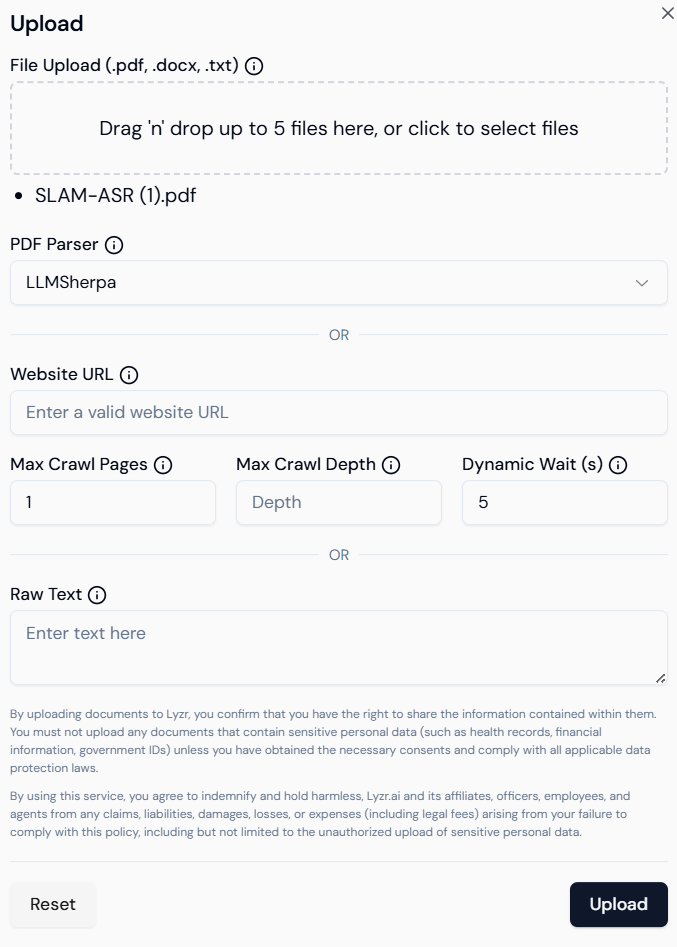
## 3. Add Content from Multiple Sources
Lyzr supports uploading or linking multiple data types. Content types supported:
* **File Upload**: PDF, DOCX, TXT, CSV, JSON.
* **Web Links**: Direct URLs of documentation pages or websites.
* **Copy-paste text**: Manually input chunks of content.
Lyzr auto-detects file formats and applies the right parser. Behind the scenes:
* Content is split into semantically coherent chunks.
* Embeddings are generated using LLMs.
* The vector store indexes these chunks for fast retrieval.
***
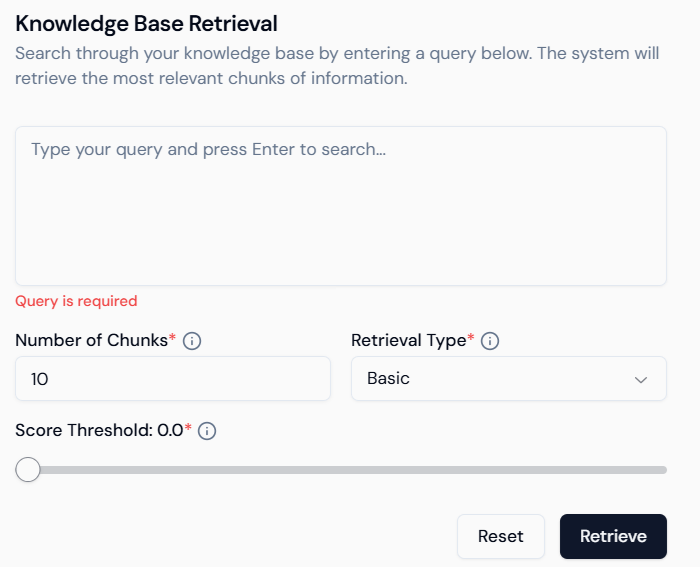
## 4. Query & Test
Once your Classic KB is populated, test it directly inside Studio:
* **Search Input**: Ask natural language questions.
* **Chunk Count**: Control number of results returned (default: 10).
* **Retrieval Type**: Basic (similarity-based).
* **Score Threshold**: Filter out low-score responses for higher precision.
You can continue uploading more files or editing your KB over time. Lyzr will automatically update the index.
***
## 5. Integrate with Agents
The Classic KB can now be connected to Lyzr agents:
* Choose the KB as a data source during agent creation.
* The agent will use this KB to perform Retrieval-Augmented Generation (RAG).
* No coding required — fully visual interface for mapping knowledge and deploying agents.
***
## Summary
| Feature | Description |
| ------------------------ | --------------------------------------------------------- |
| Fast Setup | Upload or link content in minutes. |
| Cost-Effective Retrieval | Optimized for quick queries and basic document Q\&A. |
| No-Code Interface | Simple visual UI for all KB operations. |
| Agent-Ready | Seamlessly connect to agents for real-time semantic Q\&A. |
***
The **Classic Knowledge Base** is best suited when you want to get started fast with document-based Q\&A and lightweight RAG — no database or complex configuration needed.
***
## 3. Add Content from Multiple Sources
Lyzr supports uploading or linking multiple data types. Content types supported:
* **File Upload**: PDF, DOCX, TXT, CSV, JSON.
* **Web Links**: Direct URLs of documentation pages or websites.
* **Copy-paste text**: Manually input chunks of content.
Lyzr auto-detects file formats and applies the right parser. Behind the scenes:
* Content is split into semantically coherent chunks.
* Embeddings are generated using LLMs.
* The vector store indexes these chunks for fast retrieval.
***
## 4. Query & Test
Once your Classic KB is populated, test it directly inside Studio:
* **Search Input**: Ask natural language questions.
* **Chunk Count**: Control number of results returned (default: 10).
* **Retrieval Type**: Basic (similarity-based).
* **Score Threshold**: Filter out low-score responses for higher precision.
You can continue uploading more files or editing your KB over time. Lyzr will automatically update the index.
***
## 5. Integrate with Agents
The Classic KB can now be connected to Lyzr agents:
* Choose the KB as a data source during agent creation.
* The agent will use this KB to perform Retrieval-Augmented Generation (RAG).
* No coding required — fully visual interface for mapping knowledge and deploying agents.
***
## Summary
| Feature | Description |
| ------------------------ | --------------------------------------------------------- |
| Fast Setup | Upload or link content in minutes. |
| Cost-Effective Retrieval | Optimized for quick queries and basic document Q\&A. |
| No-Code Interface | Simple visual UI for all KB operations. |
| Agent-Ready | Seamlessly connect to agents for real-time semantic Q\&A. |
***
The **Classic Knowledge Base** is best suited when you want to get started fast with document-based Q\&A and lightweight RAG — no database or complex configuration needed.