> ## Documentation Index
> Fetch the complete documentation index at: https://docs.lyzr.ai/llms.txt
> Use this file to discover all available pages before exploring further.
# Agent Builder (Conversational AI)
The **Lyzr Agent Builder** is a sophisticated, natural language interface designed to transition ideas into runnable, enterprise-grade agents in minutes. Positioned on the Lyzr Studio home page, it serves as a high-speed alternative to manual configuration, empowering both developers and business users to ship production-ready agents without starting from scratch.
 ***
## The Conversational Build Logic
The builder uses an intelligent, iterative process to handle the heavy lifting of agent architecture, moving beyond simple chat-bot creation into full autonomous system design.
### 1. Initiating the Build
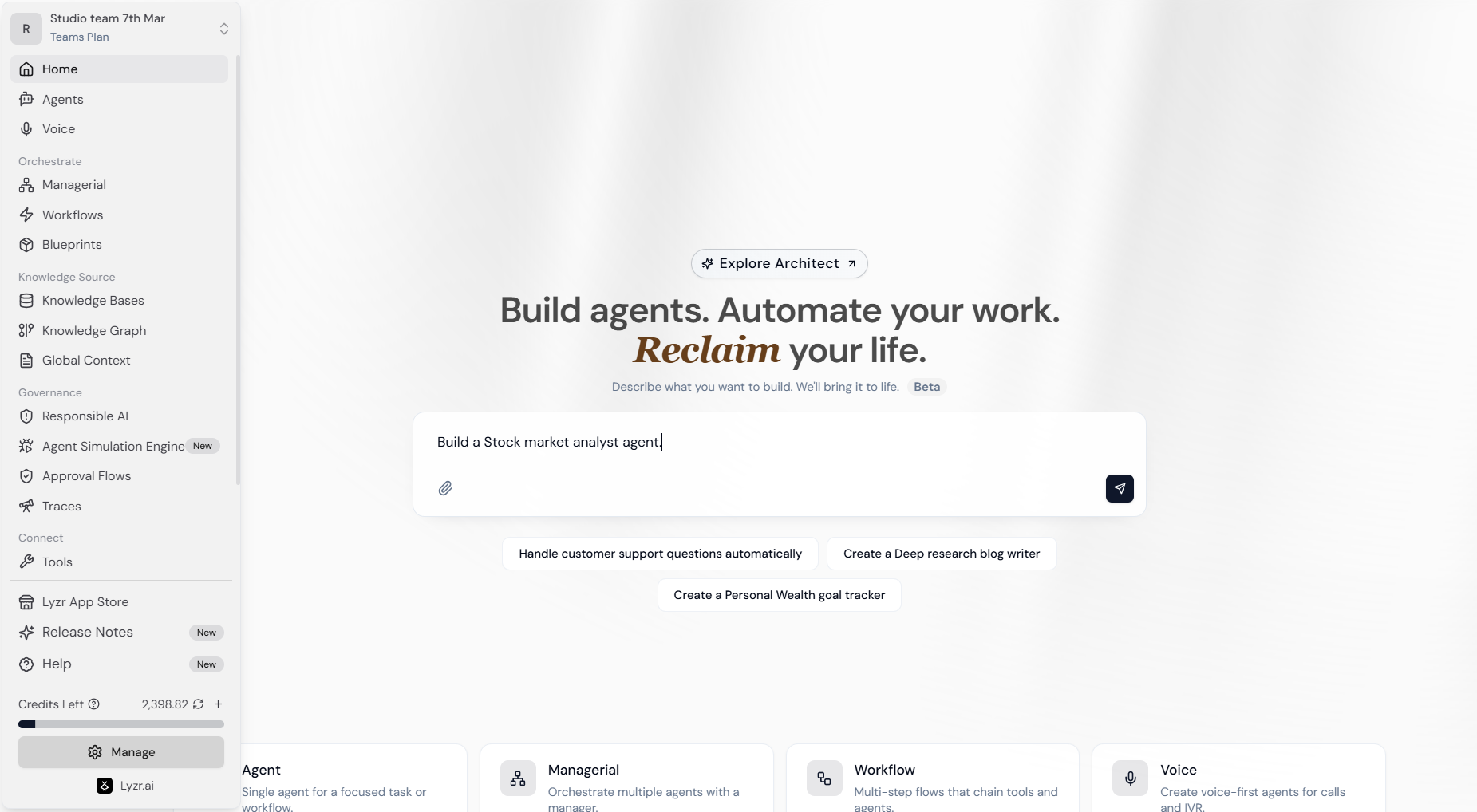
On the Studio Home screen, use the central text area to describe the agent you want to create.
* **Natural Language Input:** Simply describe the role and task (e.g., *"Build a Stock market analyst agent"*).
* **Architect Integration:** Access advanced templates and organizational blueprints by clicking **Explore Architect**.
### 2. Feature Requirement Gathering
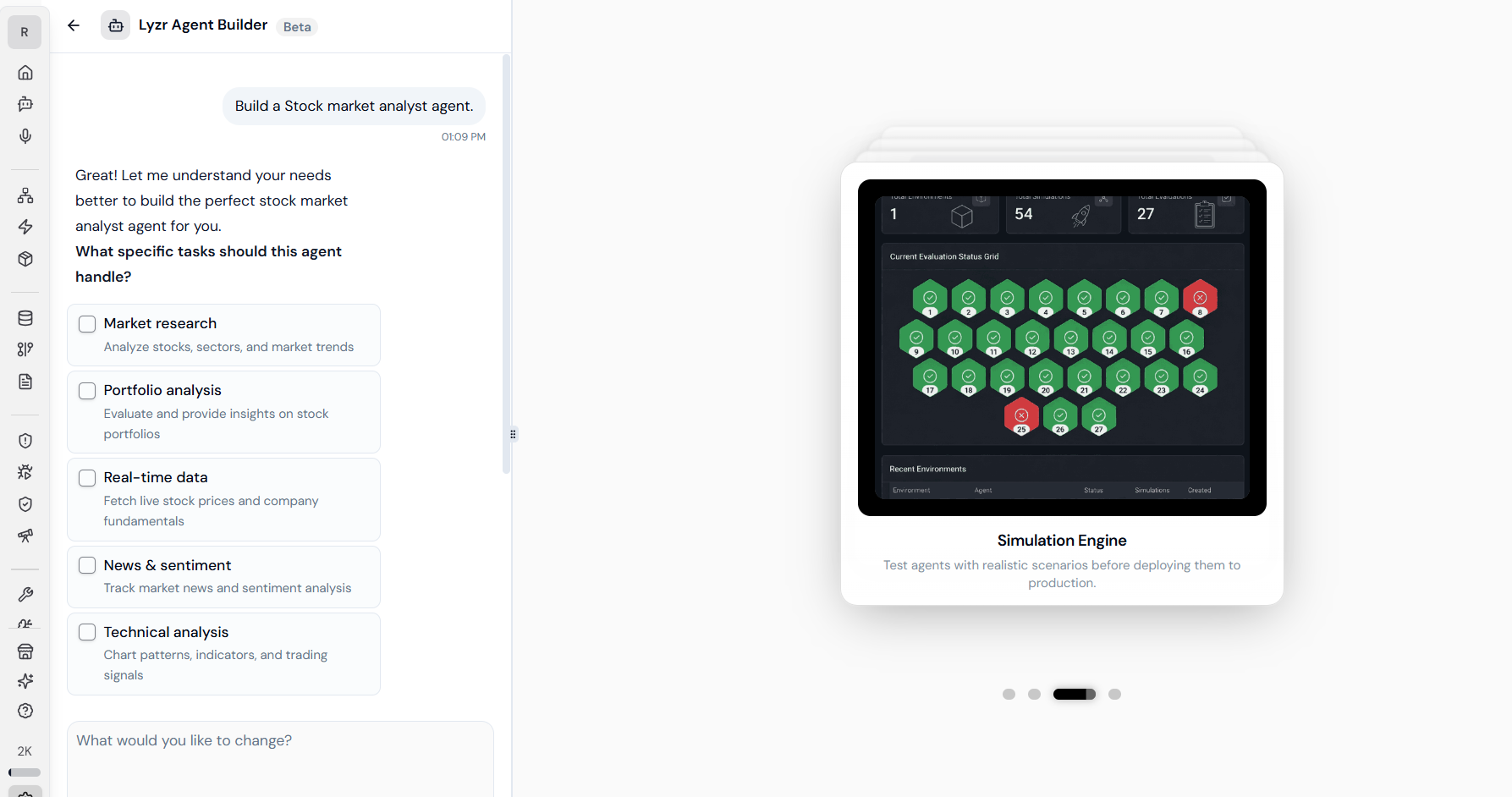
Once you submit your prompt, the **Lyzr Agent Builder** (Beta) initiates a specialized chat interface. It analyzes your request and presents a series of follow-up questions or checkboxes to refine the agent's scope.
For a specialized agent, the builder might suggest and verify:
* **Knowledge Requirements:** Does the agent need a RAG pipeline for specific documents?
* **Tool Access:** Should the agent have permissions to fetch real-time data or interact with APIs?
* **Reasoning Depth:** Identifying if the task requires high-reasoning models like o1 or Claude 3.5 Sonnet.
### 3. Automated Infrastructure Assembly
Once sufficient context is gathered, the system automatically handles the "heavy lifting" of the backend setup:
* **Model Selection:** Chooses the optimal LLM provider and model based on the complexity of the task.
* **Knowledge Provisioning:** Automatically creates or connects a **Knowledge Base** (RAG) or **Knowledge Graph**.
* **Tool Orchestration:** Identifies and connects relevant external tools (e.g., Slack, GitHub, or custom APIs).
* **Multi-Agent Setup:** Capable of establishing **Managerial Orchestration** to delegate sub-tasks to specialized worker agents.
***
## Core Capabilities & Customization
### Modular Building Blocks
While the builder automates the initial setup, you retain full control to refine the output through the Studio dashboard:
* **Manual Overrides:** At any point, you can transition to the granular **Agent Builder** screen for manual tweaking of prompts and features.
* **Skill Attachment:** Enhance agents with modular **Skills**—reusable blocks of logic or tool integrations that make agents production-ready.
* **Memory Management:** Toggle between **Lyzr Cognis** (cross-session memory) and **Lyzr Memory** (adjustable short/long-term summarization).
***
## The Conversational Build Logic
The builder uses an intelligent, iterative process to handle the heavy lifting of agent architecture, moving beyond simple chat-bot creation into full autonomous system design.
### 1. Initiating the Build
On the Studio Home screen, use the central text area to describe the agent you want to create.
* **Natural Language Input:** Simply describe the role and task (e.g., *"Build a Stock market analyst agent"*).
* **Architect Integration:** Access advanced templates and organizational blueprints by clicking **Explore Architect**.
### 2. Feature Requirement Gathering
Once you submit your prompt, the **Lyzr Agent Builder** (Beta) initiates a specialized chat interface. It analyzes your request and presents a series of follow-up questions or checkboxes to refine the agent's scope.
For a specialized agent, the builder might suggest and verify:
* **Knowledge Requirements:** Does the agent need a RAG pipeline for specific documents?
* **Tool Access:** Should the agent have permissions to fetch real-time data or interact with APIs?
* **Reasoning Depth:** Identifying if the task requires high-reasoning models like o1 or Claude 3.5 Sonnet.
### 3. Automated Infrastructure Assembly
Once sufficient context is gathered, the system automatically handles the "heavy lifting" of the backend setup:
* **Model Selection:** Chooses the optimal LLM provider and model based on the complexity of the task.
* **Knowledge Provisioning:** Automatically creates or connects a **Knowledge Base** (RAG) or **Knowledge Graph**.
* **Tool Orchestration:** Identifies and connects relevant external tools (e.g., Slack, GitHub, or custom APIs).
* **Multi-Agent Setup:** Capable of establishing **Managerial Orchestration** to delegate sub-tasks to specialized worker agents.
***
## Core Capabilities & Customization
### Modular Building Blocks
While the builder automates the initial setup, you retain full control to refine the output through the Studio dashboard:
* **Manual Overrides:** At any point, you can transition to the granular **Agent Builder** screen for manual tweaking of prompts and features.
* **Skill Attachment:** Enhance agents with modular **Skills**—reusable blocks of logic or tool integrations that make agents production-ready.
* **Memory Management:** Toggle between **Lyzr Cognis** (cross-session memory) and **Lyzr Memory** (adjustable short/long-term summarization).
 ### Multi-Channel Deployment
Every agent built via the conversational path is instantly ready for enterprise use:
* **Web/Mobile Mini-Apps:** Package your agent as a shareable app for internal teams or customers.
* **API-First Integration:** Every agent auto-generates an **OpenAPI 3.1 endpoint** and gRPC stubs, ready for microservices or protocols like **MCP**.
***
## Integrated Governance & Testing
Lyzr ensures that agents built via natural language remain safe through native integration with the **Safe & Responsible Module**.
### Simulation & Agent Hardening
* **Automated Scenarios:** The system generates realistic test cases and "personas" to stress-test your agent's logic.
* **Metric Scoring:** Responses are evaluated against metrics like **Task Completion, Hallucination, and Faithfulness**.
* **Hardening:** Lyzr analyzes failures and recommends optimal configuration updates to improve accuracy before production rollout.
### Responsible AI Guardrails
Activate the **Safe/Responsible-AI lattice** with a single click to ensure compliance and ethical operation:
* **PII Redaction:** Automatically masks sensitive data like Credit Card numbers, SSNs, and personal emails.
* **Prompt Injection Protection:** Detects and blocks malicious attempts to override agent instructions.
* **Hallucination Manager:** Employs a **Reflection Mechanism** where the agent critically assesses its own response against instructions before delivery.
***
## Next Steps
Once the Builder completes the setup, you can perform the following actions to finalize your deployment:
1. **Review in Studio:** Fine-tune the generated Agent Role, Goal, and Instructions.
2. **Test in Simulation:** Run a batch of simulations to see performance against "edge-case" user inputs.
3. **Deploy:** Connect your agent to your preferred interface (Web, Slack, or Twilio) using the auto-generated API keys.
### Multi-Channel Deployment
Every agent built via the conversational path is instantly ready for enterprise use:
* **Web/Mobile Mini-Apps:** Package your agent as a shareable app for internal teams or customers.
* **API-First Integration:** Every agent auto-generates an **OpenAPI 3.1 endpoint** and gRPC stubs, ready for microservices or protocols like **MCP**.
***
## Integrated Governance & Testing
Lyzr ensures that agents built via natural language remain safe through native integration with the **Safe & Responsible Module**.
### Simulation & Agent Hardening
* **Automated Scenarios:** The system generates realistic test cases and "personas" to stress-test your agent's logic.
* **Metric Scoring:** Responses are evaluated against metrics like **Task Completion, Hallucination, and Faithfulness**.
* **Hardening:** Lyzr analyzes failures and recommends optimal configuration updates to improve accuracy before production rollout.
### Responsible AI Guardrails
Activate the **Safe/Responsible-AI lattice** with a single click to ensure compliance and ethical operation:
* **PII Redaction:** Automatically masks sensitive data like Credit Card numbers, SSNs, and personal emails.
* **Prompt Injection Protection:** Detects and blocks malicious attempts to override agent instructions.
* **Hallucination Manager:** Employs a **Reflection Mechanism** where the agent critically assesses its own response against instructions before delivery.
***
## Next Steps
Once the Builder completes the setup, you can perform the following actions to finalize your deployment:
1. **Review in Studio:** Fine-tune the generated Agent Role, Goal, and Instructions.
2. **Test in Simulation:** Run a batch of simulations to see performance against "edge-case" user inputs.
3. **Deploy:** Connect your agent to your preferred interface (Web, Slack, or Twilio) using the auto-generated API keys.