> ## Documentation Index
> Fetch the complete documentation index at: https://docs.lyzr.ai/llms.txt
> Use this file to discover all available pages before exploring further.
# Agent Evaluation
Agent Evaluation in **Lyzr Studio** is a feature that allows you to systematically test and improve your agents. By generating test cases, executing them, and analyzing the results, you can ensure that your agents are reliable, consistent, and continuously improving with the help of LLM-powered insights.
***
## 🔹 Step 1: Selecting an Agent
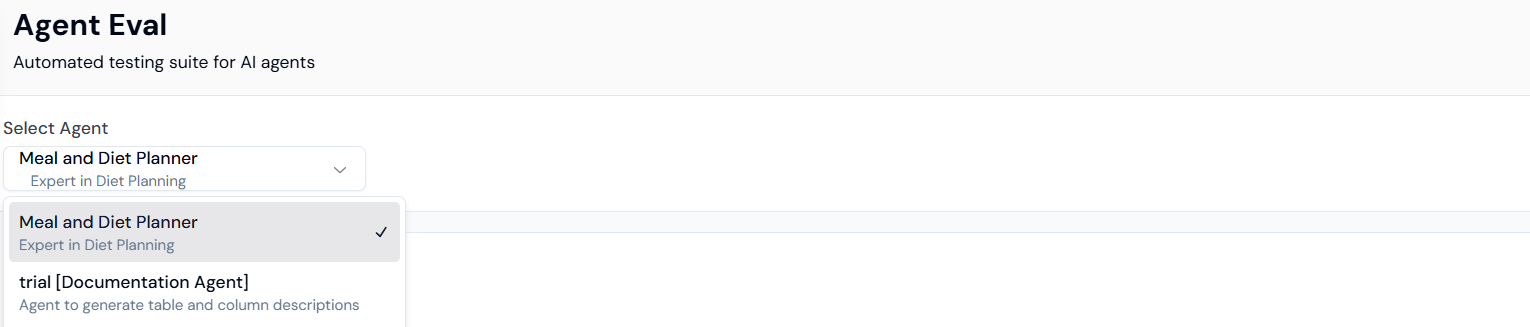
The first step is to choose the agent you want to evaluate.\
Navigate to the **Agent Evaluation** section in Lyzr Studio and select the desired agent from the list.
 ***
## 🔹 Step 2: Generating Test Cases
Once an agent is selected, you can generate test cases to validate its performance.\
You will be prompted to **Name your Test Case Group**. This helps in organizing and categorizing test cases for future reference.
***
## 🔹 Step 2: Generating Test Cases
Once an agent is selected, you can generate test cases to validate its performance.\
You will be prompted to **Name your Test Case Group**. This helps in organizing and categorizing test cases for future reference.
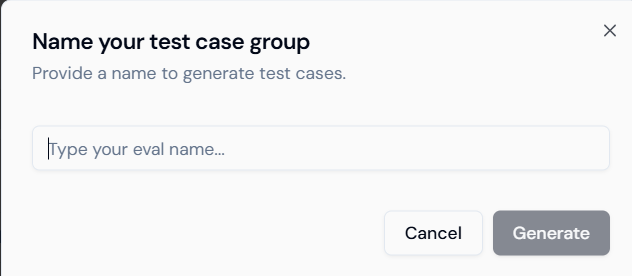 👉 Example: You could name a test case group as `FAQ_Bot_Evaluation` or `OrderTrackingAgent_Tests`.
After providing a name, click on **Generate Test Cases**. The system will automatically create relevant test cases tailored to the agent’s purpose.
***
## 🔹 Step 3: Running the Test Cases
After generating test cases, you can run them against the selected agent.\
The results of these runs will be displayed, showing the agent’s responses to each test case along with a summary of performance.
👉 Example: You could name a test case group as `FAQ_Bot_Evaluation` or `OrderTrackingAgent_Tests`.
After providing a name, click on **Generate Test Cases**. The system will automatically create relevant test cases tailored to the agent’s purpose.
***
## 🔹 Step 3: Running the Test Cases
After generating test cases, you can run them against the selected agent.\
The results of these runs will be displayed, showing the agent’s responses to each test case along with a summary of performance.
 This provides visibility into how well the agent is handling different scenarios.
***
## 🔹 Step 4: Generating Improvements
One of the key benefits of Agent Evaluation is the ability to **generate improvements**.\
Using LLM-powered analysis, Lyzr suggests ways to enhance the agent’s accuracy, coverage, and overall effectiveness based on the test case results.
This provides visibility into how well the agent is handling different scenarios.
***
## 🔹 Step 4: Generating Improvements
One of the key benefits of Agent Evaluation is the ability to **generate improvements**.\
Using LLM-powered analysis, Lyzr suggests ways to enhance the agent’s accuracy, coverage, and overall effectiveness based on the test case results.
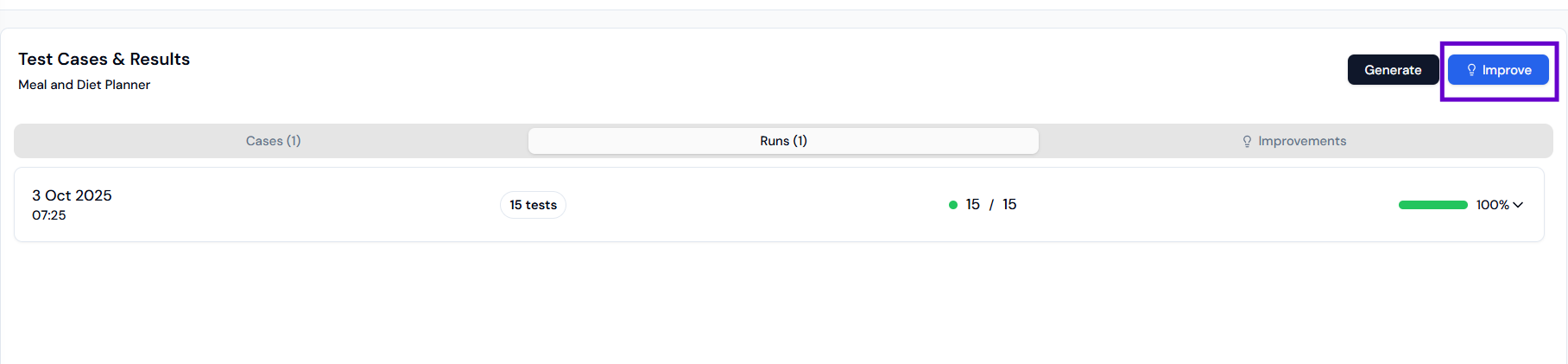 👉 This step ensures that your agent doesn’t just get tested, but also continuously learns and evolves with guided improvements.
***
## ✅ Benefits of Agent Evaluation
* **Systematic Testing** – Create structured test groups to validate your agent’s functionality.
* **Organized Workflow** – Manage multiple test case groups for different scenarios.
* **Actionable Insights** – Automatically receive recommendations for improvement.
* **Continuous Enhancement** – Keep refining your agents with every evaluation cycle.
***
## 🚀 Summary
The **Agent Evaluation** feature in Lyzr helps you move beyond just building agents – it empowers you to **test, measure, and improve** them. By combining automated test case generation, run tracking, and LLM-based improvement suggestions, Lyzr ensures your agents deliver consistent and reliable performance.
```
```
This documentation is built and hosted on [Mintlify](https://mintlify.com), a developer documentation platform.
👉 This step ensures that your agent doesn’t just get tested, but also continuously learns and evolves with guided improvements.
***
## ✅ Benefits of Agent Evaluation
* **Systematic Testing** – Create structured test groups to validate your agent’s functionality.
* **Organized Workflow** – Manage multiple test case groups for different scenarios.
* **Actionable Insights** – Automatically receive recommendations for improvement.
* **Continuous Enhancement** – Keep refining your agents with every evaluation cycle.
***
## 🚀 Summary
The **Agent Evaluation** feature in Lyzr helps you move beyond just building agents – it empowers you to **test, measure, and improve** them. By combining automated test case generation, run tracking, and LLM-based improvement suggestions, Lyzr ensures your agents deliver consistent and reliable performance.
```
```
This documentation is built and hosted on [Mintlify](https://mintlify.com), a developer documentation platform.