> ## Documentation Index
> Fetch the complete documentation index at: https://docs.lyzr.ai/llms.txt
> Use this file to discover all available pages before exploring further.
# Composio Tools
# 🧰 Available Tools
Lyzr integrates seamlessly with a wide range of popular platforms to empower your AI agents. From productivity and collaboration to development, communication, and entertainment—these tools enable intelligent automation and enhanced workflows.
***
## ⚙️ What Are Tools in Lyzr?
Tools are external services and applications that your agents can access to perform actions, fetch data, or trigger workflows. By connecting these tools, your AI agents can move beyond passive Q\&A into powerful automation.
***
## 🚀 Tool Categories
### 🧑💼 Productivity & Collaboration
***
### 🛠 Development & Version Control
***
### 💬 Communication & Social
***
### 🎵 Entertainment & Media
***
### 🔍 AI & Search
***
## 🛠 How to Use Tools
1. Go to **Tools > Add Tool** in the Studio.
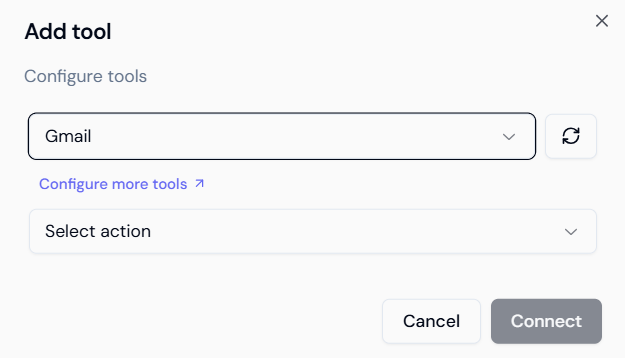 2. Select the tool and complete authentication or API key setup.
3. Configure actions available for each tool.
2. Select the tool and complete authentication or API key setup.
3. Configure actions available for each tool.
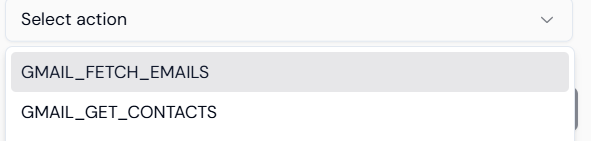 After selecting a tool, you can configure which **specific action** you want the agent to perform with that tool.
For example:
* For Google Calendar: "Schedule meeting", "List events"
* For Notion: "Update page", "Create new task"
* For Gmail: "Send email", "Search inbox"
4. Start building agent workflows using natural prompts like:
> “Schedule a meeting with John via Google Calendar.”\
> “Tweet our new product launch.”\
> “Play the Chill Lo-Fi playlist on Spotify.”
***
## ✨ Pro Tip
Tools can be combined into **multi-agent workflows**. For instance, an update from GitHub can trigger a Notion doc update and Slack notification.
***
Learn to equip agents with OpenAPI, code, and custom tools.
After selecting a tool, you can configure which **specific action** you want the agent to perform with that tool.
For example:
* For Google Calendar: "Schedule meeting", "List events"
* For Notion: "Update page", "Create new task"
* For Gmail: "Send email", "Search inbox"
4. Start building agent workflows using natural prompts like:
> “Schedule a meeting with John via Google Calendar.”\
> “Tweet our new product launch.”\
> “Play the Chill Lo-Fi playlist on Spotify.”
***
## ✨ Pro Tip
Tools can be combined into **multi-agent workflows**. For instance, an update from GitHub can trigger a Notion doc update and Slack notification.
***
Learn to equip agents with OpenAPI, code, and custom tools.